



Traffic on a WordPress site depends on more than good content. If search engines fail to properly crawl, index, or interpret your pages, even the best articles will struggle to rank.


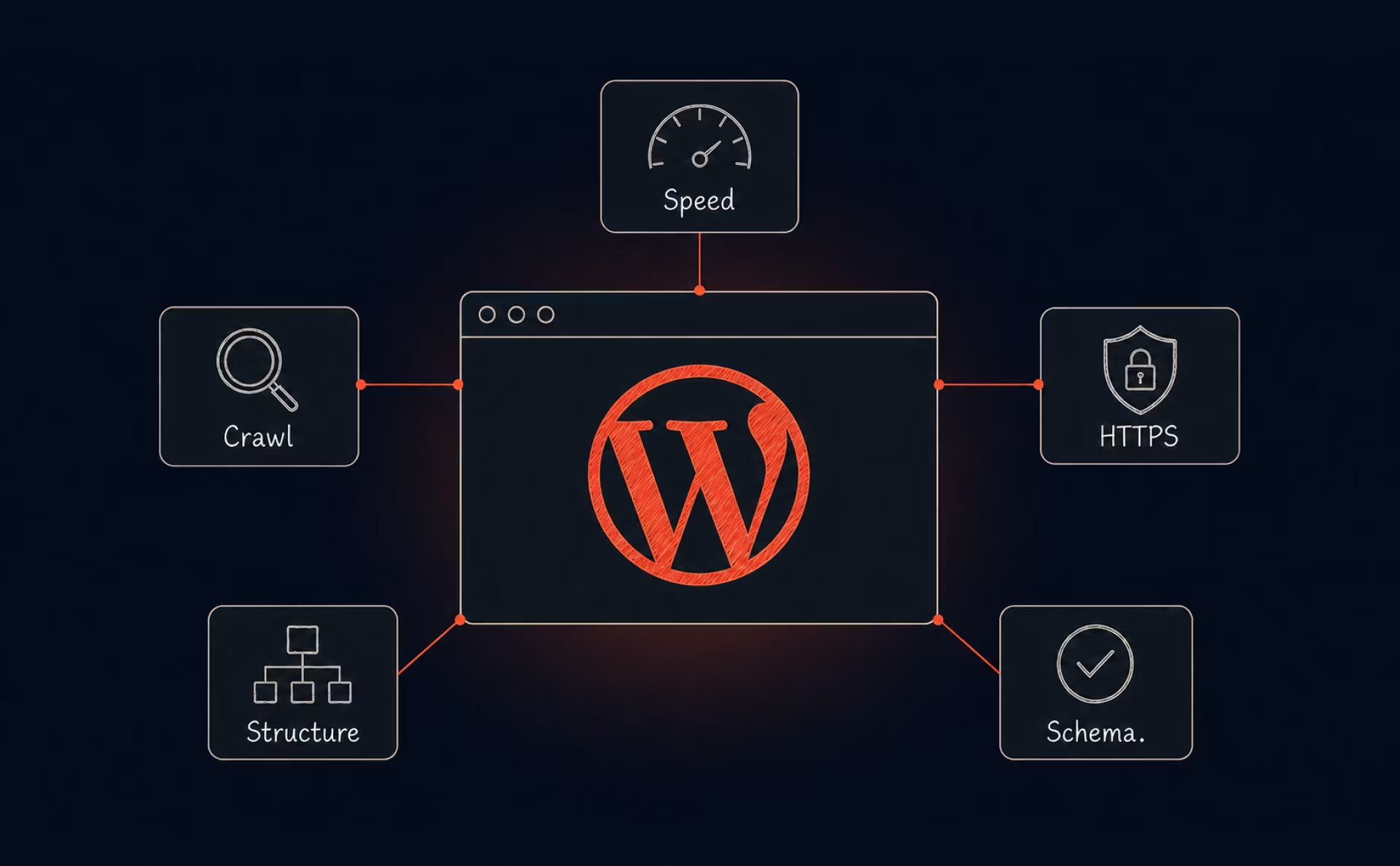
A significant share of websites across the web runs on WordPress. It’s adaptable, scalable, and well-suited for content creators. Yet its popularity does not guarantee strong search visibility. In this article, we’ll walk through every major technical element you need to configure, monitor, and maintain. You will see what makes WordPress unique, which issues most often break rankings, and how to prevent them.
{{banner}}
What is technical SEO
Let’s begin with the basics. Technical SEO involves optimizing your website’s structure so search engines can easily crawl, understand, and index your content. It does not directly deal with keywords or content strategy. Instead, it supports them and ensures that everything you publish can actually be discovered and ranked.
In simple terms, it answers a few essential questions:
- Can search engines access your site?
- Can they understand its structure?
- Are your pages fast and secure?
- Are there errors that block indexing?
If any of these areas are misconfigured, your visibility in search results can decline even when your content is strong. So, technical SEO works behind the scenes. Visitors rarely notice it when everything functions correctly, yet search engines rely on it heavily. Core elements of technical SEO include:
- website speed and performance, which affect user behavior and crawl efficiency
- mobile usability that impacts how your site performs under mobile-first indexing
- crawlability and indexability, which ensure bots can reach your important pages
- structured data implementation that clarifies context
- canonicalization, which prevents duplicate content confusion
- secure HTTPS configuration that protects user data and builds trust
- properly managed XML sitemaps and robots.txt files that guide search engines through your site architecture.
Every one of these factors shapes how search engines interpret your material and assess its overall value. If you still know a little about this topic, check out our technical SEO guide for beginners.
Why technical SEO for WordPress is different
Although WordPress makes publishing content simple and accessible, it also brings technical challenges that are easy to overlook. Themes, plugins, page builders, and custom scripts often make it more complex. Many site owners install multiple plugins to expand functionality without considering how those additions affect speed, crawl efficiency, or overall site structure.
WordPress automatically generates archive pages, category listings, tag archives, and attachment pages. If these elements are not configured properly, they may lead to duplicate pages or low-value content. Certain themes include bloated code that slows down performance. Core, theme, and plugin updates may also change technical behavior in ways that impact SEO settings.
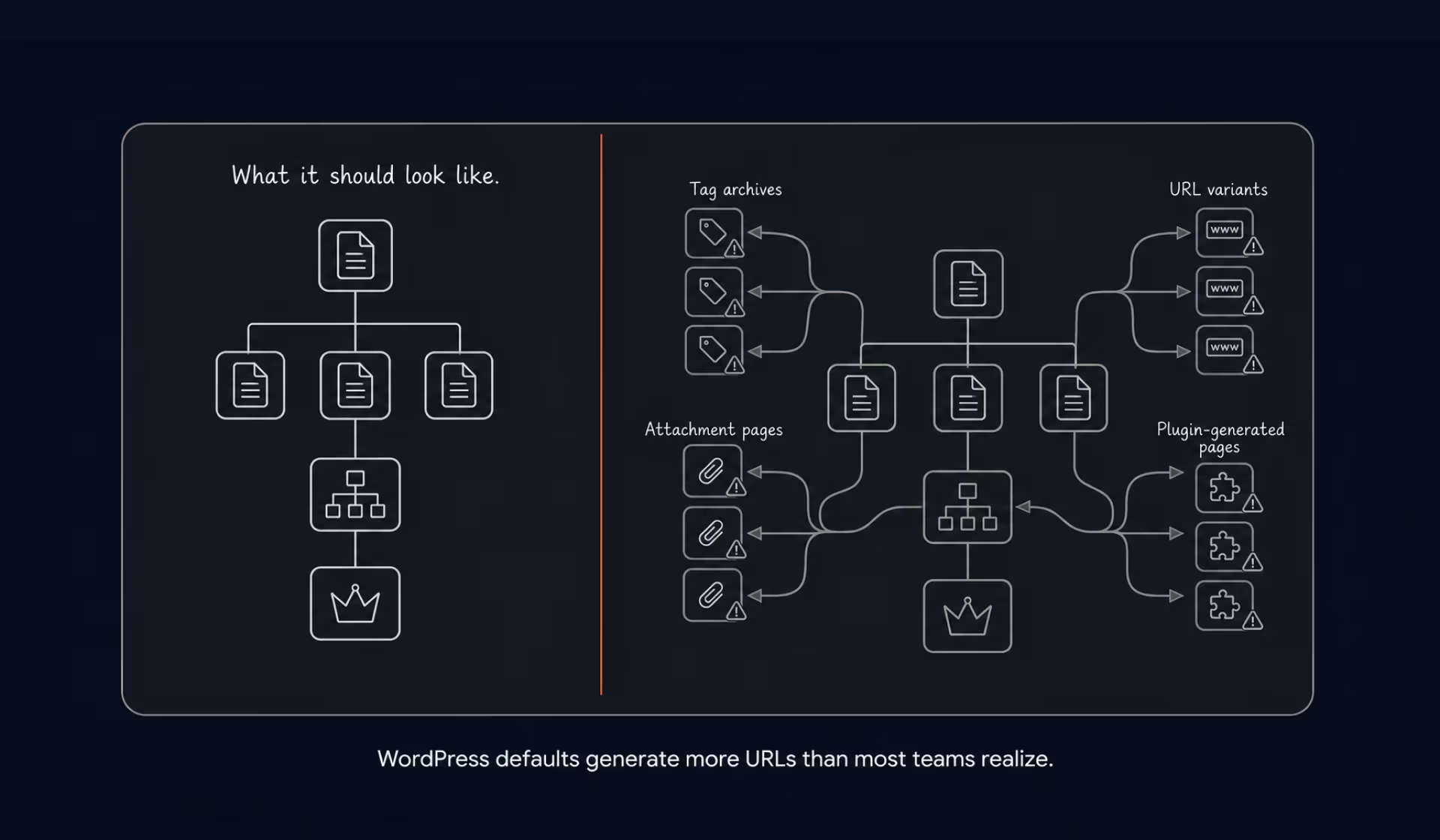
When we work with clients at Halo Lab, we often see websites with strong content but weak backend configuration. The structure is left at default settings, redirects are unmanaged, and duplicate pages are indexed unintentionally. The goal is to take control of how WordPress behaves instead of relying on automatic configurations. In order to do that, check the sections below, which illustrate common issues and useful fixes for technical SEO.
1. Set up WordPress for technical SEO
A correct setup is the foundation of strong technical SEO for WordPress. When WordPress is configured properly from the start, you prevent structural problems that can affect search visibility later.
Begin with permalink settings. Clean URLs such as yourdomain.com/post-name/ make your pages easier for both users and search engines to understand. Yet, you should avoid numeric strings or unnecessary parameters that add noise to your structure.
Next, verify that search engine visibility is enabled. In the WordPress reading settings, ensure the option that discourages indexing is not activated. It is common for this box to remain checked after development, which silently blocks your entire site from search engines.
Moreover, install one reliable SEO plugin — Yoast SEO and Rank Math are the two most widely used options. Both manage metadata, XML sitemaps, canonical tags, and technical settings from a single interface. Using multiple SEO plugins at the same time can result in system conflicts, duplicated metadata, and problems with indexing.
After that, remove default posts, pages, themes, and plugins that are not in use, as unnecessary elements can slow down performance and introduce security risks. Besides, configure default title tags and meta descriptions so that new pages follow a consistent SEO structure.
2. Use HTTPS and secure your website
Since Google prioritizes secure websites, and users expect their data to be protected, safe HTTPS is now a required standard in modern SEO.
To protect your WordPress site, you need to install and activate an SSL certificate via your hosting provider. Then force HTTPS across your entire website so that all traffic is redirected automatically. Internal links should be updated to use secure URLs, and HTTP versions must redirect permanently to HTTPS using 301 redirects. Your preferred secure version should also be verified in Google Search Console.
Security plays a role in compliance and user trust as well. If your site collects personal data, your privacy policy must be accessible and indexable.
3. Choose and enforce a single site version
Your website can exist under several variations, including HTTP, HTTPS, and versions with or without “www.” Search engines consider these versions as separate URLs unless they are properly consolidated.
The main thing here is to select one preferred version and enforce it across your entire site using permanent redirects. Internal links should always point to the chosen version, and canonical tags must confirm the preferred URL. This consistency prevents duplicate content and preserves link equity.
If you are planning structural changes or moving domains, follow a detailed website migration guide to avoid traffic loss and broken indexing. Migration mistakes are one of the most common causes of sudden ranking drops in WordPress SEO.
4. Improve website performance and speed
Performance is central to technical SEO for WordPress. Page speed affects user behavior, crawl efficiency, and rankings. Google’s Core Web Vitals set a clear benchmark: Largest Contentful Paint (LCP) should be under 2.5 seconds, First Input Delay (FID) under 100ms, and Cumulative Layout Shift (CLS) under 0.1. Pages outside these thresholds are at a competitive disadvantage in rankings. And as we all know, slow websites often lead to higher bounce rates and lower user engagement, which can negatively impact search visibility.
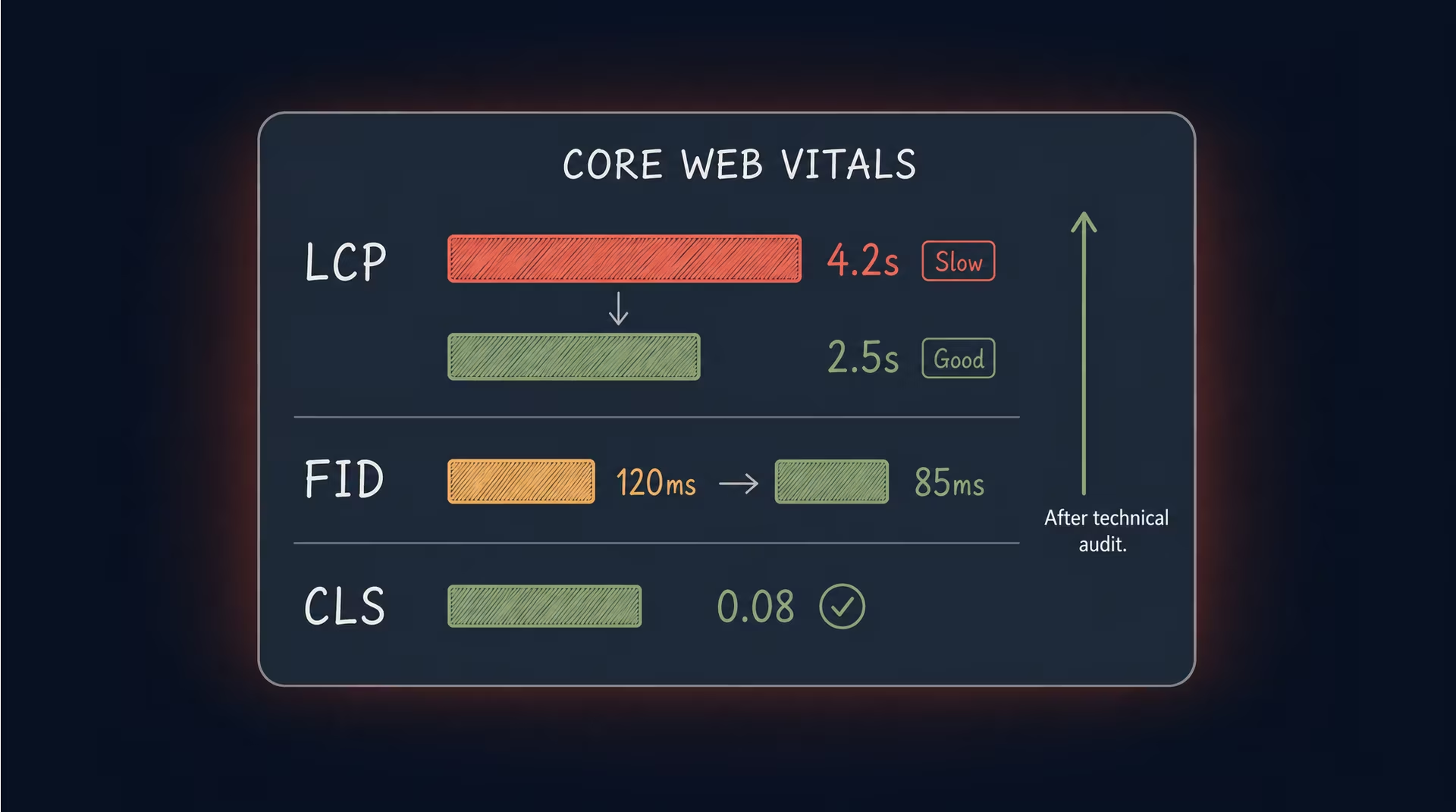
Improving speed begins with quality hosting. Underpowered servers create bottlenecks that no plugin can fully solve. Caching mechanisms help deliver static versions of pages faster (WP Rocket and W3 Total Cache are the two most widely deployed options). Minifying CSS and JavaScript removes unnecessary code and reduces file size, which helps improve loading speed. Performance gains also come from using compression methods like GZIP or Brotli. A content delivery network distributes resources geographically, lowering latency for global users.
Reducing plugin overload also improves speed. Many WordPress sites accumulate plugins that duplicate functionality or load unnecessary scripts. Cleaning your database of revisions and unused data improves backend efficiency. In practice, you must check your theme’s layout file for render-blocking scripts — any <script> tag in the <head> block that lacks async or defer forces the browser to pause page rendering entirely until that script loads.
5. Make your WordPress site mobile-friendly
Google applies mobile-first indexing. What does it mean for you? In essence, the mobile version of your site determines how it is ranked. A desktop-optimized site with poor mobile performance will struggle in search. Responsive WordPress design allows your website layout to display correctly on all screen sizes. So, you can space the buttons and navigation elements properly to avoid user frustration. Mobile page speed is especially critical because mobile users frequently access websites on slower network connections.
Evaluate your website using Google’s Mobile-Friendly Test and PageSpeed Insights tools. If your theme is outdated or overloaded with scripts, switching to a lightweight responsive theme can significantly improve both usability and SEO performance.
6. Ensure your site is crawlable and indexable
Search engines must first crawl and understand pages to include them in rankings. Crawlability refers to how easily search engine bots can access and navigate your website, while indexability determines whether those pages can appear in search results.
Common issues include unintended noindex tags on important pages, broken internal links, blocked resources in robots.txt, or weak internal linking structures. These problems often remain unnoticed until traffic declines.
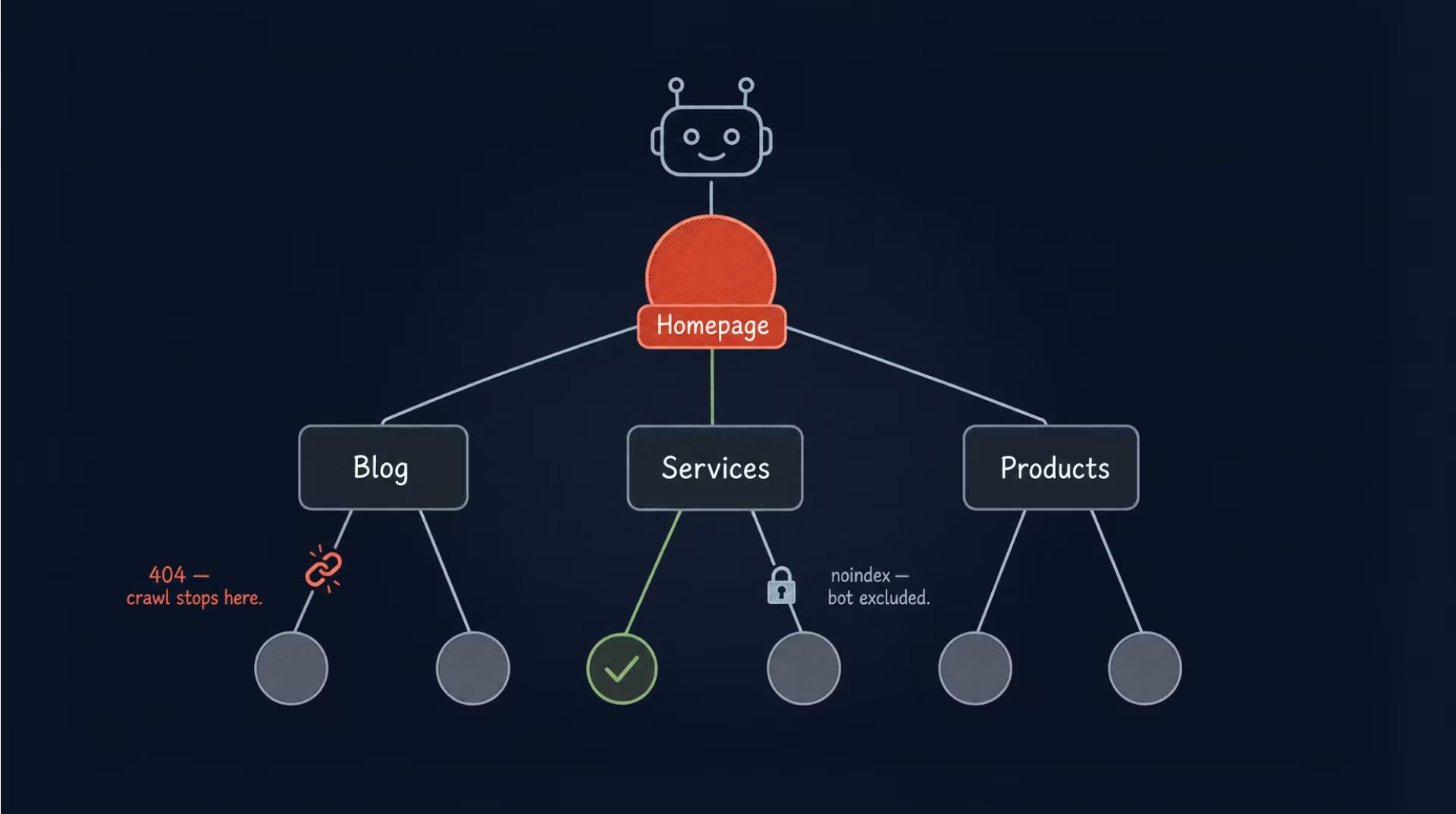
A logical architecture helps search engines move through your site efficiently. Important pages need to be directly reachable from the homepage without unnecessary depth. Orphan pages without internal links should be eliminated. Also, you should regularly review your index coverage in Search Console. If you notice missing pages in search results, our article Google doesn’t index my website may help you determine why and what to do next.
7. Configure robots.txt correctly
The robots.txt file tells search engines which parts of your site they can crawl. If configured incorrectly, this file can accidentally block important resources or entire directories. What is the solution?
First, avoid blocking CSS or JavaScript files required for rendering and ensure essential directories remain accessible. Your XML sitemap should be properly referenced and accessible. At the same time, avoid careless blocking directives, since they can remove valuable pages from search visibility overnight. For a deeper explanation, read our complete guide to robots.txt to ensure your configuration supports proper indexing.
{{banner-2}}
8. Optimize XML sitemaps for WordPress
XML sitemaps help search engines discover and prioritize pages efficiently. Most SEO plugins automatically create sitemaps, but these still need to be reviewed and validated.
To begin with, exclude thin or duplicate pages that don’t provide value. Archive or tag pages may also need to be removed if they create unnecessary duplication. Your sitemap should include only valuable, indexable pages, helping search engines focus on the content that matters. Once it’s ready, submit it to Search Console to help search engines discover updates faster.
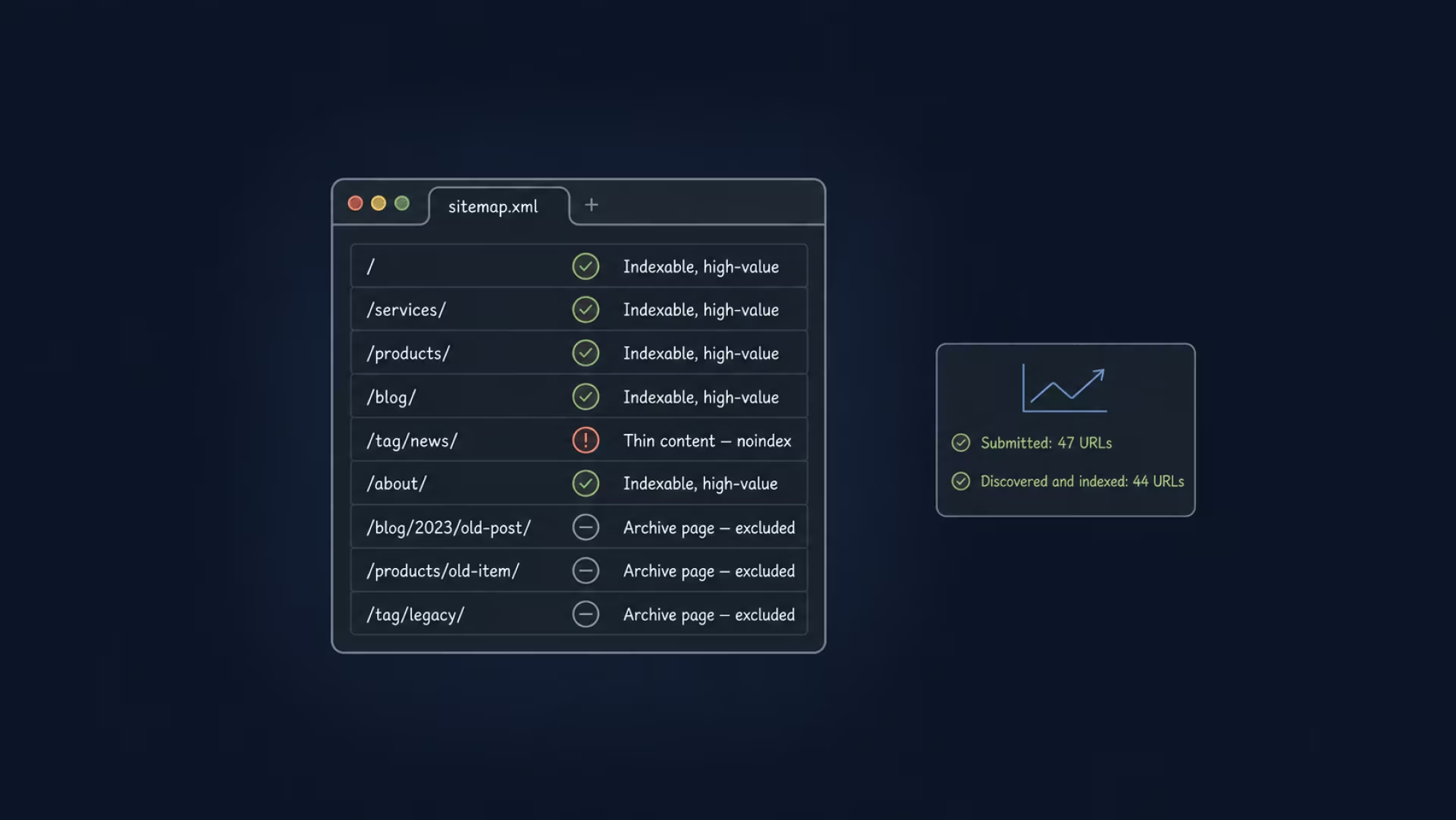
To structure your sitemap effectively, review the guide to website XML sitemap, which provides detailed recommendations.
9. Fix broken links and 404 errors
Undoubtedly, broken links harm user experience and waste crawl budgets, but why do they appear? They often result from deleted pages, URL changes without redirects, incorrect internal linking, or plugin conflicts.
Regularly crawling your site with SEO tools such as Screaming Frog or Ahrefs Site Audit helps detect 404 errors. Besides, relevant pages should be redirected using permanent redirects, and internal links must be updated accordingly. While continuous monitoring ensures new issues are addressed quickly, clean link management strengthens usability and preserves ranking signals.
Each broken link represents lost potential for traffic or engagement.
10. Resolve duplicate content issues
WordPress can unintentionally create duplicate content through archive pages, author listings, attachment pages, and pagination. When multiple URLs display similar content, search engines often cannot clearly determine which version deserves to rank.
It’s the canonical tags that tell search engines which version of a page should be treated as the primary one. Basically, you must use noindex directives for unnecessary archives, merge similar pages where possible, and avoid publishing identical content across multiple categories.
11. Set up redirects correctly
Redirects are essential when URLs are updated, pages are removed, domains are migrated, or a site switches to HTTPS. Incorrect redirect handling can cause ranking drops and inefficient crawling.
For any permanent change, use a 301 redirect — never a temporary one. Keep redirects as direct as possible by eliminating chains, since each extra hop reduces authority and increases crawl cost. For instance, chains of three or more should always be consolidated into a single step. Finally, make sure internal links point straight to the final URL, avoiding unnecessary redirects altogether.
12. Optimize images for technical SEO
Images significantly impact both site performance and accessibility. Large file sizes, for example, reduce page speed, affecting both user experience and search engine efficiency. Thus, you must compress images before uploading using tools like ShortPixel or Smush (both integrate directly with WordPress). Meanwhile, WebP and other modern formats compress images while preserving visual quality.
Another important feature here is descriptive alt text. It enhances accessibility and helps search engines understand what images represent. Name files descriptively using hyphens before uploading: “waterproof-hiking-boots-merino-lining.jpg” rather than “IMG_4925.jpg.”
Each image is indexed independently, so the filename and alt text are separate keyword-targeting opportunities. Beyond these elements, optimize how images load: use lazy loading to defer off-screen images until they are needed, and define their dimensions to prevent layout shifts that negatively affect CLS.
13. Implement structured data and schema markup
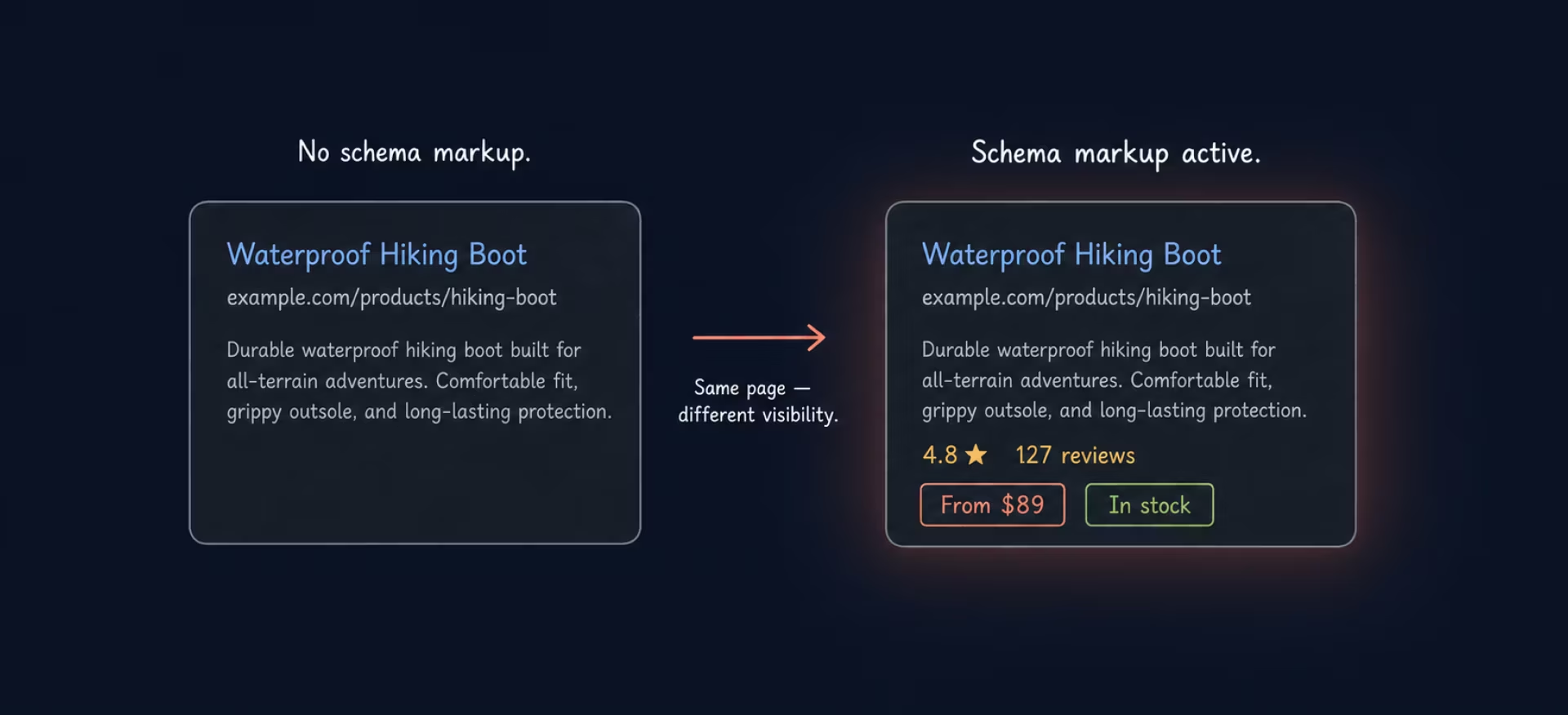
Structured data adds meaningful context, helping search engines interpret your content more accurately. By implementing schema markup, you can provide additional information that enables enhanced search results, such as rich snippets, ratings, FAQs, product details, and breadcrumb paths.
WordPress plugins, like Yoast SEO, Rank Math, and Schema Pro, often include built-in schema options, but validation remains essential. Use Google’s Rich Results Test to verify that your implementation is correct. Applying structured data to articles, services, products, and FAQs increases visibility and improves click-through rates. Clear context also improves how search engines present your content to users.
14. Monitor technical SEO with Google Search Console
Ongoing monitoring helps keep your technical SEO stable over time. Google Search Console provides insights into indexing, crawl errors, manual actions, Core Web Vitals, mobile usability, security warnings, and structured data issues. Review these reports regularly to catch problems early and track performance trends to identify unexpected changes in traffic or search visibility.
For routine checks, use a structured SEO audit checklist to assess your site’s technical health step by step. If the data points to more complex or persistent issues, a comprehensive SEO audit can help uncover structural problems that may be affecting your rankings.
What breaks WordPress SEO most often
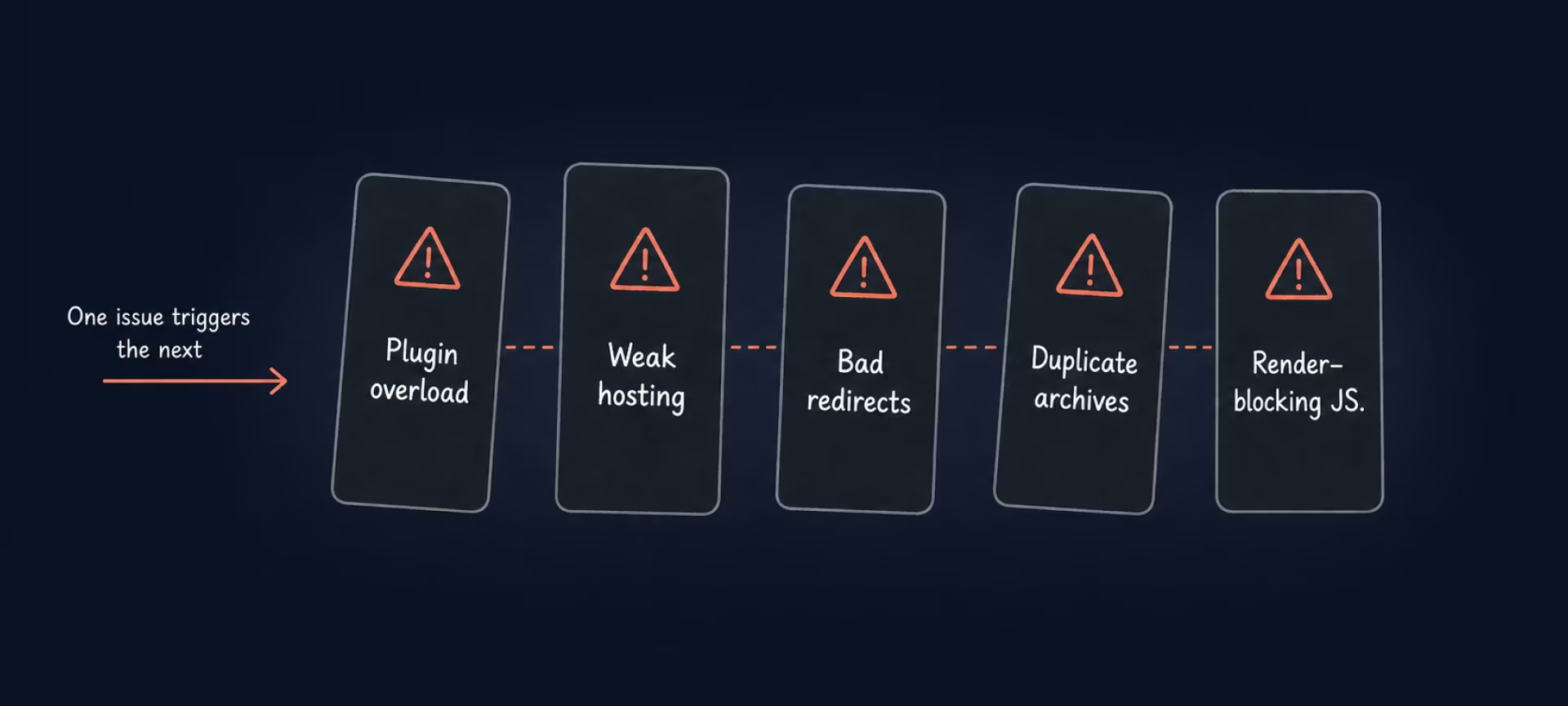
Even well-built WordPress sites can lose visibility when technical foundations weaken. In practice, small issues often accumulate unnoticed until rankings begin to drop. Common causes of declining technical SEO performance include:
- Plugin overload. Too many or overlapping plugins can create conflicts, duplicate metadata, broken canonical tags, and unnecessary redirects.
- Poor hosting quality. Slow servers and unstable uptime reduce crawl efficiency and negatively affect user engagement signals.
- Incorrect indexing settings. Accidental noindex tags or leftover staging configurations can remove key pages from search results.
- Broken redirects and URL changes. Missing or incorrect 301 redirects lead to lost authority, while redirect chains waste crawl budget.
- Duplicate archive pages. Category, tag, and author archives can dilute ranking signals without proper canonicalization or indexing control.
- Heavy themes and page builders. Bloated code and excessive JavaScript slow down rendering and hurt performance.
- Outdated plugins and themes. These increase security risks and may break structured data or metadata.
- Blocked resources. Restricting CSS or JavaScript in robots.txt can prevent proper page rendering and indexing.
These issues rarely appear all at once; instead, they build gradually. As a result, ranking drops are often misattributed to algorithm updates, when technical problems are the real cause.
How to maintain technical SEO on a WordPress site
WordPress sites evolve continuously as new content is added, plugins are installed, and system updates are applied. Without structured oversight, technical SEO performance can slowly deteriorate. We have some advice for you to prevent such a situation.
Ongoing monitoring and monthly checks
First, review Google Search Console for indexing warnings, crawl errors, and coverage reports on a monthly basis. Performance metrics reveal sudden drops in impressions or clicks that may signal technical issues. Do regular speed testing to make sure that new plugins or content changes have not reduced performance. Regularly scanning for broken links helps maintain internal link integrity, which supports both user navigation and search engine crawling. At the same time, monitoring uptime ensures that your site remains consistently accessible to search engines, preventing disruptions in indexing and visibility.
Quarterly technical audits
In addition to routine monitoring, conduct deeper technical reviews on a quarterly basis. Audit redirect structures to eliminate outdated or chained redirects. Ensure XML sitemaps include only indexable and valuable pages. Review and validate structured data to confirm it aligns with current content. Optimize the database by removing unnecessary revisions and improving backend efficiency to support overall performance.
Post-update technical checks
After WordPress core, theme, or plugin updates, additional checks are critical. Test key pages across devices to ensure functionality remains intact. Confirm that important pages stay indexable and that canonical tags still reference correct URLs. Verify that no unintended noindex directives were introduced during updates. Even small configuration changes can influence how search engines interpret your site.
Technical SEO in practice: from zero to 383,000 monthly users
One project we worked on involved launching an online games catalog on a new domain with no history, established traffic, or backlink profile. Before launch, we prepared its URL structure, canonical tags, robots.txt, sitemap.xml, and HTTPS configuration. We also published a “coming soon” page so Google could discover and index the domain before the full website went live.
By January 2023, the site had attracted its first 400 users from Google. By May 2024, that figure had grown to 383,000 monthly users. Technical SEO was only one part of a broader strategy that also included content creation, competitor research, link building, and ongoing optimization. Although the site was not built on WordPress, the technical work behind its launch reflects the same principles covered in this guide.
Build a stable technical SEO foundation
Technical SEO gives every other SEO effort a better chance to work. For a WordPress site, that means more than completing the initial setup. It requires keeping the site fast, secure, crawlable, and free from structural issues that can quietly limit search visibility.
The steps in this guide provide you with a practical framework for doing that — from configuring core settings and improving performance to managing indexing, redirects, structured data, and ongoing updates. Applied consistently, they create a stable foundation that helps your content remain discoverable and supports your site as it grows.
{{banner-3}}
FAQ
How soon can technical SEO improvements show results?
It depends on the issue and crawl frequency. Minor fixes may reflect within weeks. Larger structural updates may take one to three months as search engines recrawl and reassess your pages.
Can technical SEO changes negatively affect rankings?
Yes. Incorrect redirects, blocking pages in robots.txt, or misusing noindex tags can reduce visibility.
Can WordPress updates impact technical SEO?
They can. Updates may change code structure, schema markup, or page speed.
Which technical SEO issues to fix first on WordPress?
Start with crawlability, indexability, HTTPS implementation, and speed optimization. These directly affect how search engines access and evaluate your pages.
Can SEO plugins fully handle WordPress technical SEO?
Plugins help with metadata, sitemaps, and canonical tags. However, they do not replace proper hosting, performance tuning, or structured architecture planning.
Is technical SEO a one-time setup or an ongoing process?
It is ongoing. WordPress sites evolve with new content, plugins, and updates.