



A great website can look polished, read clearly, and still remain almost invisible in search. The issue is not always in the idea, design, or content itself. Sometimes, the real problem sits deeper — in the quiet signals search engines rely on before they decide what deserves attention.


A great website can look polished, read clearly, and still remain almost invisible in search. The issue is not always in the idea, design, or content itself. Sometimes, the real problem sits deeper — in the quiet signals search engines rely on before they decide what deserves attention.
Every search result starts long before a user types a query. Search engines first need to discover your pages, follow internal links, read technical instructions, store relevant content in their index, and evaluate how well the site performs. When this process breaks, even useful pages can stay invisible.
Technical SEO gives you control over that foundation. It helps search engines access your content, understand your site structure, avoid duplicate or low-value pages, and recognize when your website is fast, stable, and ready for users. In this beginner's guide, we'll walk through the essentials of crawling, indexing, and performance, and show how each part supports stronger organic visibility.
What is technical SEO
The term refers to the behind-the-scenes part of search optimization that shapes how a website is built, organized, and presented to search engines. At its core, this branch of SEO strengthens the technical setup of a site, ensuring that nothing blocks crawlers, confuses indexing systems, or slows down the way pages load and function.
Typical areas of technical SEO include:
- page accessibility and crawlability;
- site speed and performance;
- URL structure and consistency;
- indexing signals and directives;
- structured data implementation.
Together, these elements create a cleaner environment for both search engines and users. They help crawlers move through the site, understand its structure, and process important pages more efficiently.
Technical SEO also supports other areas of search optimization. It improves internal linking, helps distribute authority across pages, and makes it easier for search engines to discover updates. These connections are part of a much larger SEO system. For a broader view of how search optimization works, see our beginner's guide to SEO.
Why technical SEO is important
Search engines can only rank what they can access, understand, and store correctly. When a website has technical barriers, even valuable pages may be missed, misunderstood, or excluded from search results. Technical SEO helps remove those barriers before they turn into lost visibility.
These issues can appear in different ways. Crawlers may fail to discover important pages, index duplicate versions of the same content, or spend too much time on low-value URLs. Sometimes, a page is crawled but not indexed. In other cases, it appears in search results with the wrong URL, outdated content, or missing context.
Common issues include:
- slow page loading that limits crawl efficiency and frustrates users;
- duplicate URLs that split ranking signals across several versions;
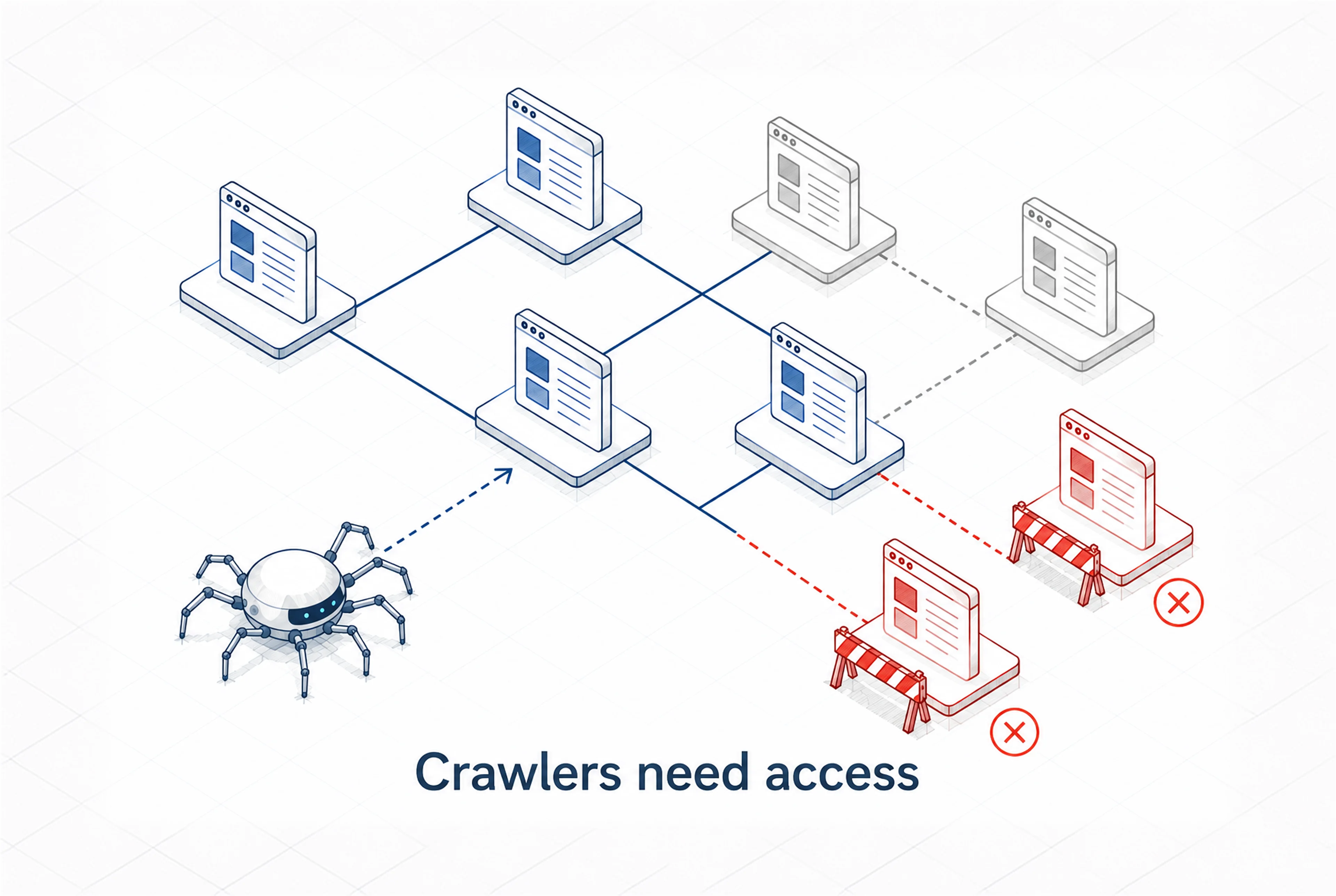
- blocked pages that prevent search engines from accessing key content;
- broken links that disrupt navigation and crawling paths.
The difficulty is that these problems rarely look obvious from the outside. A website may seem perfectly functional to users while search engines encounter hidden obstacles behind the scenes. Over time, those gaps can affect how often pages are crawled, how reliably they appear in search results, and how stable their rankings become.
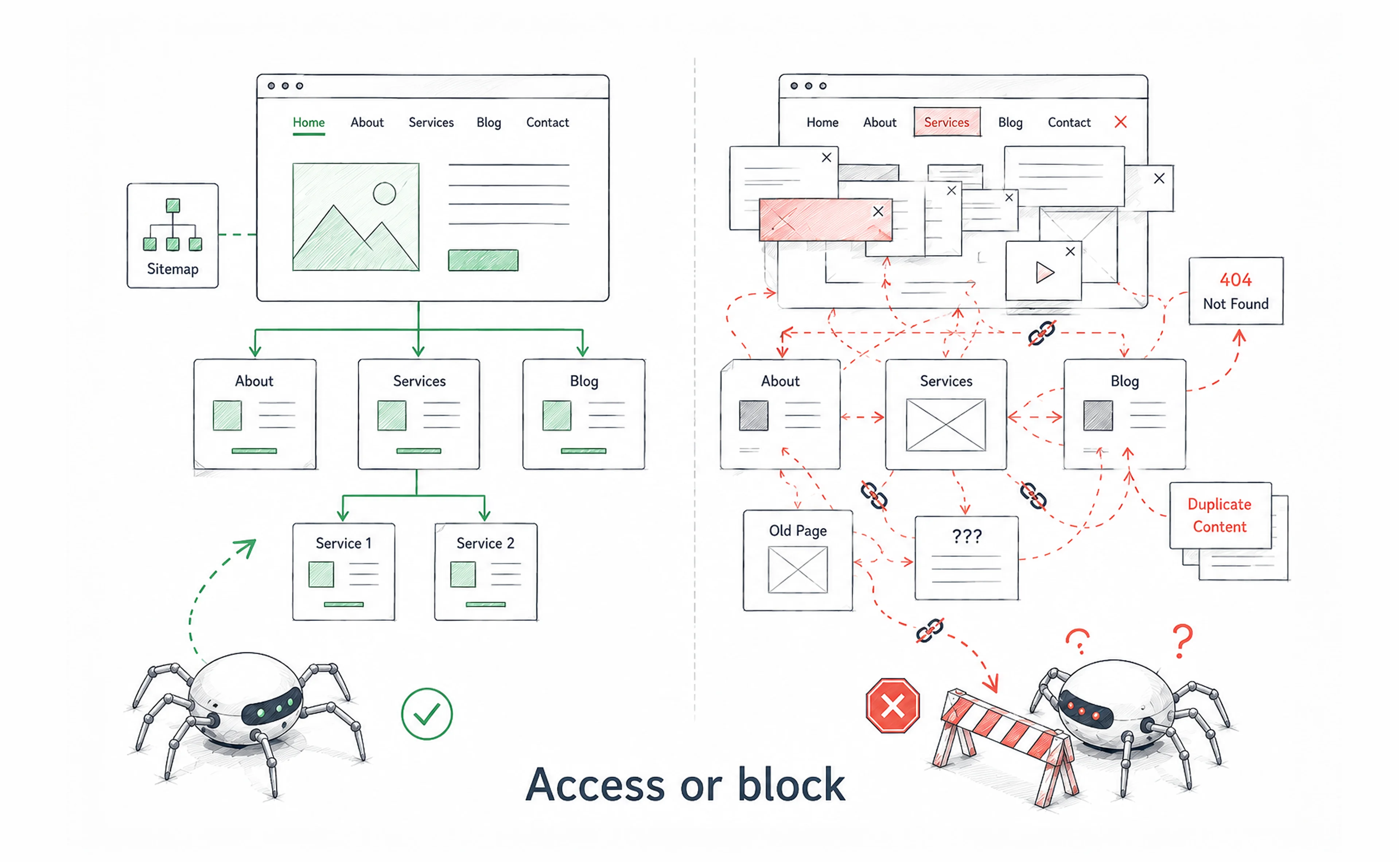
For example, imagine that an important landing page starts returning a 404 error after a site update. Visitors who follow that page from search results reach a dead end instead of the service or product they expected. Some may search again, but many will leave. If similar issues repeat across several important pages, the site can lose traffic, leads, and trust without an immediately visible cause.
Technical SEO protects visibility by making sure search engines can reach the right pages, read the right signals, and show the right version to users.
Crawling
Crawling describes how search engines discover content across the web. Before a page can appear in search results, it has to be found, fetched, and reviewed by search engine crawlers.
These crawlers move from one URL to another by following links. They examine how pages are connected, how easy they are to access, and how often they appear to change. A well-structured website makes this process smoother, while a poorly organized one creates obstacles that can limit visibility.
Crawling efficiency affects how quickly new content is discovered and how often existing pages are revisited. If important pages are buried deep in the site, blocked by technical rules, or disconnected from internal links, search engines may not prioritize them.
How search engines crawl websites
Search engines use automated programs called crawlers to find and examine website content. These bots usually start with a list of known URLs, then expand their path through internal and external links.
The process often includes:
- visiting a webpage and loading its content;
- analyzing internal and external links;
- identifying new URLs to explore;
- adding those URLs to a crawl queue.
Crawlers do not visit every page equally. Pages with strong internal linking, frequent updates, and higher authority tend to be crawled more often. Pages that are isolated, duplicated, or difficult to access may receive less attention.
Robots.txt
Robots.txt is a simple but powerful file that helps control how crawlers interact with your website. It sits in the root directory and tells search engines which sections they can or cannot access without requiring changes to individual pages.
A minimal robots.txt file may look like this:
User-agent: *
Disallow: /admin/
Disallow: /cart/

Sitemap: https://example.com/sitemap.xml
This setup allows crawlers to access the main website while keeping admin, cart, or other non-public areas out of the crawl path. However, robots.txt should be handled carefully. Blocking the wrong folder can prevent search engines from reaching important pages or resources.
For example, you should not accidentally block CSS or JavaScript files that are needed to render your pages correctly. Even if the page content itself is technically accessible, blocked resources can make it harder for search engines to understand the full layout and experience.
Typical robots.txt uses include:
- allowing access to important content sections;
- blocking admin, cart, or private areas;
- pointing crawlers to the sitemap location.
Incorrect configuration can lead to serious issues. Important pages may be blocked unintentionally, or critical resources may become inaccessible. For a detailed explanation of proper setup, read our complete guide to Robots.txt.
XML sitemaps
XML sitemaps provide search engines with a structured list of important URLs on your website. They act as a roadmap that helps crawlers discover pages faster and understand which URLs should be considered for crawling.
Crawlers can still find pages through links, but sitemaps reduce the chance that important URLs get missed. This is especially useful for large websites, new pages, or sections with limited internal linking.
A sitemap speaks to search engines in a structured format, for example:
<url>
  <loc>https://example.com/blog/technical-seo-guide</loc>
  <lastmod>2026-06-19</lastmod>
</url>
Submitting a sitemap through search engine tools can improve crawl coverage and help search engines discover new or updated content faster. To set it up correctly, see our XML sitemap guide.
Crawl budget
Search engines do not revisit every page on a website equally often. Instead, they allocate crawl resources, often referred to as crawl budget, which influences how many pages are visited within a certain timeframe.
For small websites, crawl budget is usually not a major concern. It becomes more important for large websites with thousands of URLs, frequent updates, duplicate pages, or many parameter-based variations. If crawl resources are wasted on low-value URLs, important content may be crawled less often.
Crawl budget is often wasted on:
- duplicate URLs that repeat the same content;
- parameter-based pages that create endless variations;
- broken links that lead to dead ends;
- unnecessary navigation paths;
- low-value pages that do not need to appear in search.
Improving crawl efficiency helps search engines focus on valuable pages and revisit them more reliably.
{{banner}}
Check crawl activity
Monitoring crawl activity helps you understand how search engines interact with your website over time. It shows which pages are being crawled, how often crawlers visit the site, and whether access or performance issues are getting in the way.
Google Search Console provides crawl statistics that can show:
- total crawl requests;
- average response time;
- server errors;
- crawl trends over time.
Sudden drops in crawl activity may point to technical problems, such as server issues, blocked pages, broken redirects, or slower site performance. Regular checks help you notice these changes earlier, before they affect indexing or organic visibility.
Log file analysis
Log file analysis gives a more detailed view of crawler behavior. Server logs record requests made to your website, including visits from search engine bots. By reviewing this data, you can see which pages are crawled frequently, which pages receive little attention, where errors occur, and whether crawl resources are being spent on low-value URLs.
A basic log file review can help you:
- request server logs from your hosting provider;
- import the data into a log analyzer or custom parser;
- check which URLs search bots visit most often;
- identify pages with repeated errors or redirects;
- find important pages that receive little or no crawler activity.
This type of analysis is especially useful for large websites, e-commerce platforms, and content-heavy sites where crawl patterns are harder to understand from standard SEO tools alone.
Indexing
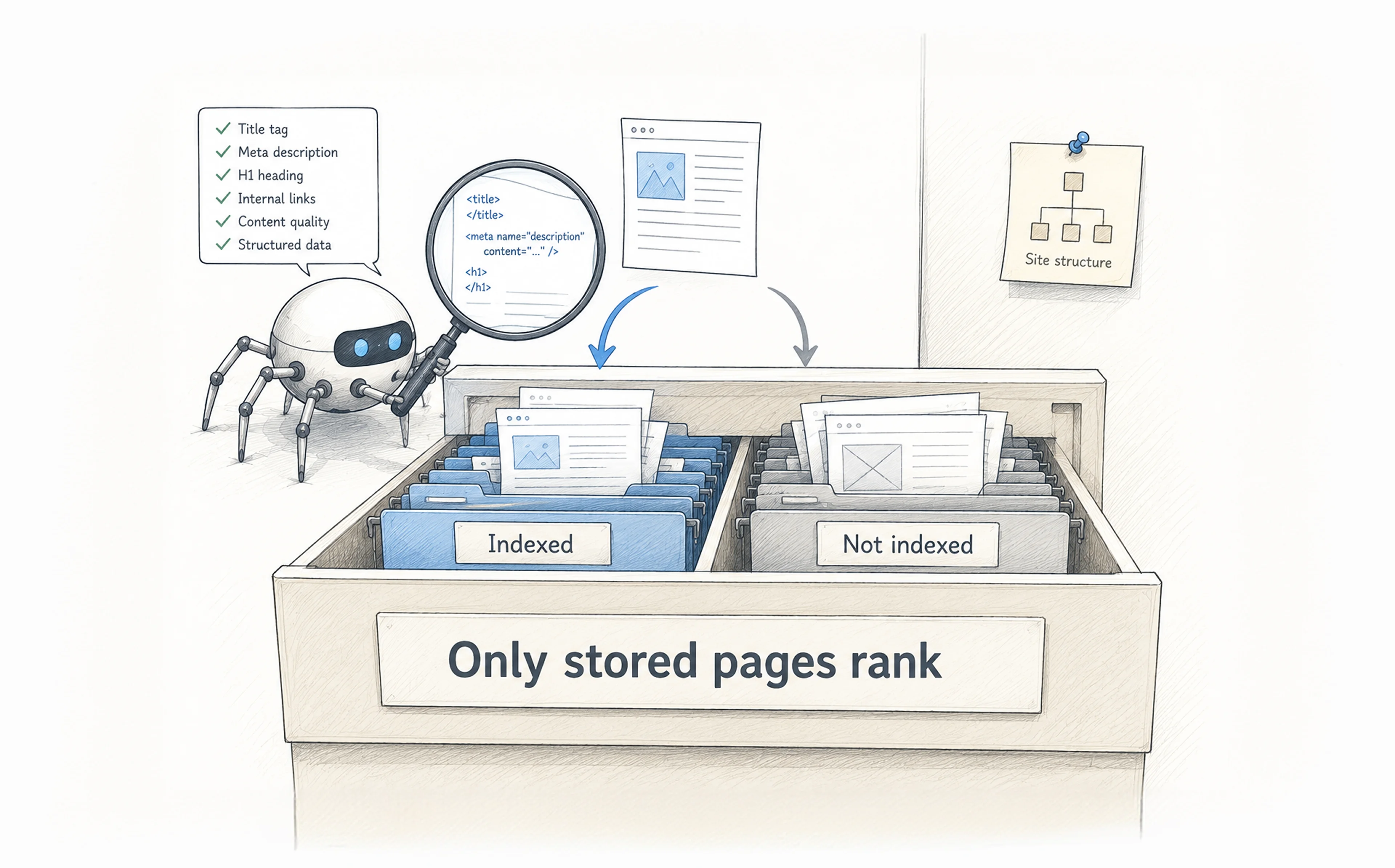
After crawling, search engines move to the next stage — indexing. During this phase, the information collected from pages is analyzed, processed, and stored in a large search database. Only pages that enter this index can appear in search results, which makes indexing a critical step in SEO.
Not every crawled page gets indexed. A page may be accessible to crawlers but still excluded if search engines find conflicting signals, duplicate content, weak relevance, or instructions that prevent indexing. In other words, crawling means a page was discovered, whereas indexing means it was deemed suitable to store and display in search results.
How indexing works
Indexing begins when a crawler retrieves a page and sends its data for analysis. Search engines evaluate the content, structure, internal links, metadata, canonical signals, and broader context to understand what the page is about and how it relates to other pages.
From there, the page may be stored in the index, ignored, or treated as a duplicate of another URL. Even when a page is indexed, it may still rank poorly if its topic, value, or relevance is unclear. The goal of indexing is not just to store a page, but to interpret it correctly.
Meta robots tags
Meta robots tags give page-level instructions to search engines. They are placed directly in the <head> section of your HTML and tell crawlers whether a page should be indexed, followed, or excluded from search results.
A common example tells search engines not to index a page while still allowing them to follow its links:
<meta name="robots" content="noindex, follow">This can be useful for pages that users need, but search results do not, such as thank-you pages, internal search results, or certain filtered pages. However, a misplaced noindex tag can make an important page silently disappear from search. This often happens when a staging rule is left in place after launch or when templates apply the same directive too broadly.
Canonical tags
Canonical tags help manage duplicate or near-duplicate content by pointing search engines to the preferred version of a page. If the same product, article, or service page is reachable through several URLs, the canonical tag tells search engines which version should be treated as the main one.
For example:
<link rel="canonical" href="https://example.com/products/blue-shoes" />Without proper canonicalization, search engines may index duplicate versions of the same content or rank a less important URL instead of the preferred one. This can weaken visibility, split ranking signals, and make search results less consistent. To understand this setup in more detail, read our guide on what a canonical tag is.
Indexing issues
Indexing issues appear when important pages fail to enter search results, when outdated pages remain indexed, or when the wrong URL version appears instead of the preferred one. These problems often come from technical misconfigurations rather than the content itself.
Common causes include crawl restrictions, misplaced noindex tags, incorrect canonical tags, duplicate content, redirect problems, or pages that are difficult to render. The tricky part is that these issues are not always visible to users. A page may load normally in the browser while search engines still exclude it from the index. Regular checks for indexing issues help confirm that the right pages are discoverable, indexable, and represented correctly in search.
Site structure
Site structure defines how pages are arranged and connected across a website. It shapes how users move through content and how search engines understand the relationships between pages. A well-planned structure makes it easier to see which pages matter most, how topics are grouped, and how authority flows through the site.
When structure is unclear, crawlers may struggle to understand context or priority. Important pages can become buried, while less relevant ones receive unnecessary attention. A logical setup helps search engines process content more efficiently and supports stronger organic visibility.
Website architecture
Website architecture refers to the way content is organized across a site. Most websites rely on a hierarchical model, where broad sections lead to more specific pages. This creates a natural path for both users and search engines.
Typically, everything starts from the homepage, which links to main categories. Those categories lead to more specific sections and, eventually, to individual pages. This layered approach helps keep navigation predictable and distributes authority across the site.
For example, a software company might use this path: Home → Products → Project Management → Task Automation. Each level becomes more specific, and the final page is still easy to reach from the homepage. If an important page is buried six or seven clicks deep, search engines may crawl it less often, even if the content itself is useful.
A strong architecture reduces the number of clicks needed to reach important pages and prevents sections from becoming isolated. It also supports better crawling because search engines can follow clear paths through the site. For a deeper look at how structure connects with development decisions, see our guide on SEO and web development.
Internal linking
Internal linking connects related pages within the same website and creates pathways for both users and crawlers. These links help search engines discover pages that may not be visible from the main navigation alone.
When pages are linked thoughtfully, authority flows more naturally across the site. Important pages receive stronger signals, while supporting content helps reinforce topical relevance. Internal links also give search engines more context about how different pages relate to one another.
A weak internal linking structure can leave valuable pages isolated. These are often called orphan pages because no other page links to them. If a page is not linked from anywhere, crawlers may only reach it through the sitemap, which can make it less visible within the site's natural structure.
Google Search Console's Links report can help reveal pages with few or no internal links pointing to them. Strengthening these connections improves crawl coverage and helps important content receive the attention it deserves.
Breadcrumbs
Breadcrumbs serve as a secondary navigation system that shows the path to the current page. They are usually placed near the top of a page and help users understand where they are within the site structure.
For users, breadcrumbs make it easier to move back to broader sections. For search engines, they provide additional context about how a page fits into the overall hierarchy. This reinforces structure signals and reduces navigation friction.
A breadcrumb trail for a blog post might look like this: Home > Blog > Technical SEO > This article. Each step is a link, and each link gives search engines another clue about where the page sits and what surrounds it.
Adding BreadcrumbList schema markup alongside the visible trail gives search engines a structured version of the same information. In some cases, this can also help search results display a breadcrumb-style path instead of a plain URL.
Pagination & faceted navigation
Large websites often split content across multiple pages or use filters to organize large sets of products, articles, or listings. This is where pagination and faceted navigation become important. Both systems help users browse content, but they can also create complexity for search engines.
If they are not configured properly, filters and parameters can generate many similar or duplicate URLs. Each variation may look like a separate page to crawlers, even when it does not add meaningful content. This increases crawl load and can dilute ranking signals.
For example, a single product category with filters for color, size, and material can quickly create URLs such as:
- /shoes?color=blue;
- /shoes?color=blue&size=M;
- /shoes?color=blue&size=M&material=leather.
To a crawler, each URL may appear as a separate page. In reality, many of these variations repeat the same core content. Common solutions include using canonical tags to point filtered URLs back to the main category page or applying a noindex directive to parameter-generated pages that should remain accessible to users but excluded from search results.
Managing these elements requires clear rules about which URLs should be indexed and which should stay out of the index. A well-managed navigation system helps search engines focus on meaningful pages, keeps crawling efficient, and ensures that important content remains the priority.
Page experience & performance
Search engines look beyond content alone. They also evaluate whether a page is fast, stable, secure, and usable across devices. These page experience signals help determine whether users can access content comfortably once they arrive.
A technically optimized website loads quickly, responds smoothly, and presents content without disruption. When performance issues appear, users may leave before the page becomes useful, and search visibility can weaken over time.
Page speed
Page speed affects both user experience and crawl efficiency. When pages load slowly, visitors wait longer before they can read, click, or take action. Search engines also need more time to process each URL, which can make crawling less efficient across the site.
Most speed problems come from a mix of technical choices: slow server response, oversized files, heavy scripts, render-blocking resources, or unoptimized images. Each issue may seem small on its own, but together they make the page feel delayed and harder to use.
That delay is where performance becomes a business problem. A page that loads just a few seconds too slowly can lose users before they ever see the content. For a site with steady monthly traffic, this can mean missed leads, sales, or sign-ups.
Core Web Vitals
Core Web Vitals measure how a page performs in real-world conditions. They focus on three key aspects of experience: loading speed, responsiveness, and visual stability.
The main metrics are:
- LCP (Largest Contentful Paint), which measures how quickly the main content loads;
- INP (Interaction to Next Paint), which measures how quickly the page responds to user interaction;
- CLS (Cumulative Layout Shift), which measures how much the layout moves while loading.
As a general benchmark, Google considers good scores to be LCP under 2.5 seconds, INP under 200 milliseconds, and CLS under 0.1. These scores can be checked in PageSpeed Insights, Lighthouse, or the Core Web Vitals report in Google Search Console, with separate data for mobile and desktop.
Mobile usability
Google uses mobile-first indexing — meaning the mobile version of your site is the primary version used for ranking, even for desktop searches. A page that works well on a desktop but struggles on smaller screens (cramped layouts, unreadable text, poorly spaced tap targets) can lose visibility regardless of how well the desktop version performs.
Google's Mobile-Friendly Test gives you a fast verdict on any URL — paste in a page address, and it returns a pass or fail alongside a rendered screenshot. The three most common failures are text that requires pinching to read, buttons placed too close together for a finger tap, and content wider than the screen that forces horizontal scrolling. Any of these is enough to affect mobile rankings regardless of how the desktop version performs.
HTTPS
HTTPS protects communication between the browser and the server by encrypting data during transmission. This helps prevent unauthorized access and gives users a safer browsing experience.
Search engines treat secure websites as the modern standard. Sites without HTTPS may trigger browser warnings, which can cause users to leave before they even reach the content. Beyond trust, HTTPS also supports many modern web features and performance improvements. Maintaining HTTPS across the entire site helps keep the experience consistent, secure, and reliable.
By the time performance shows up as a problem in your data, the decision that caused it was often made much earlier.
JavaScript SEO and rendering
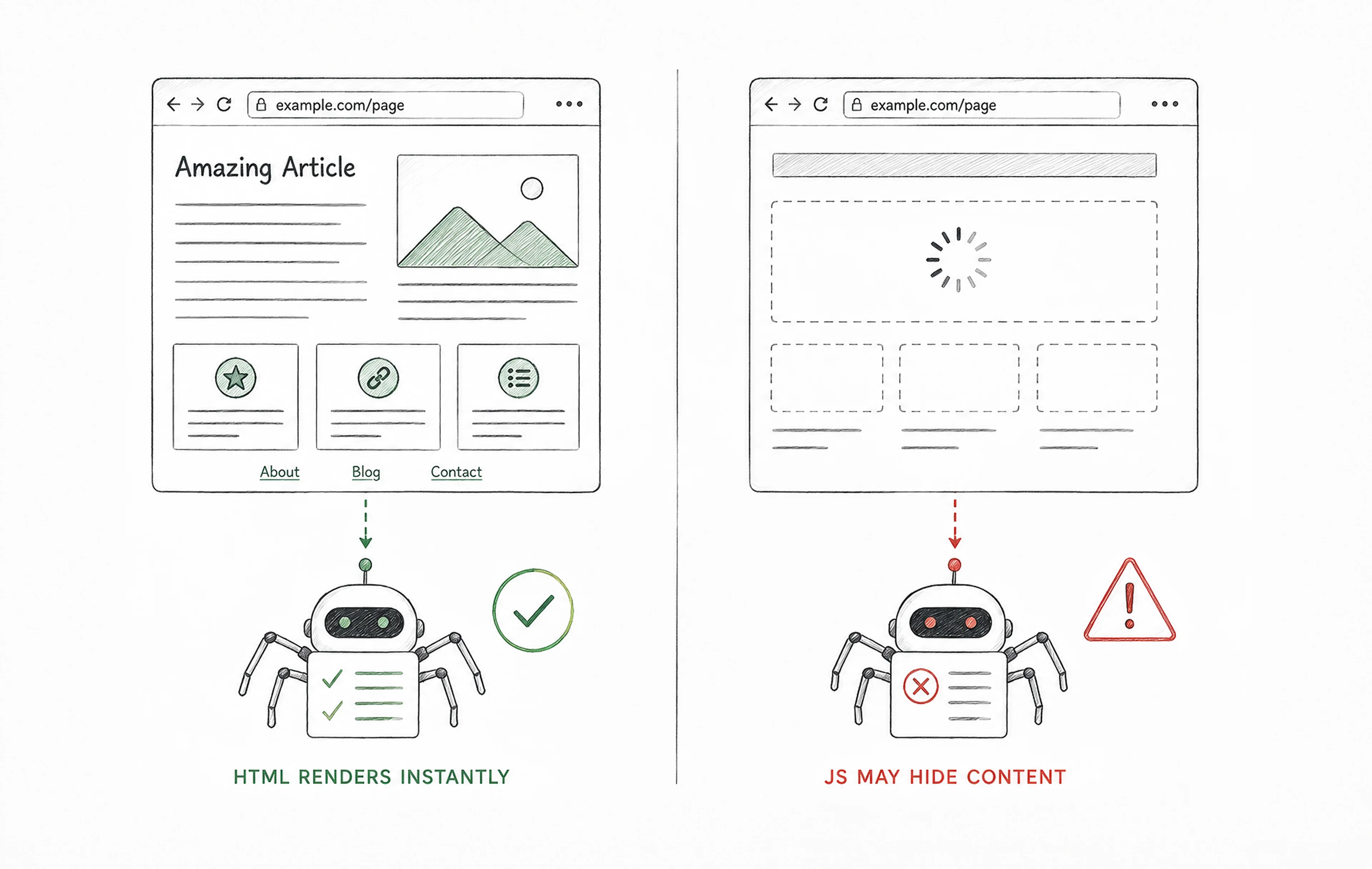
JavaScript frameworks can make websites more interactive, but they also add complexity for search engines. Unlike static HTML, JavaScript-heavy pages often need to be rendered before crawlers can see the full content. If that process fails, important text, links, images, or page sections may be missed or indexed incorrectly, creating a gap between what users see in the browser and what search engines can process.
To reduce that risk, important content and links should be available in the rendered HTML whenever possible. Server-side rendering, static generation, or pre-rendering can help deliver a more accessible version of the page to crawlers. You can check this with Google Search Console's URL Inspection tool and pay attention to blank screens, broken layouts, missing sections, delayed loading, blocked resources, or content that only appears after user actions. When handled correctly, JavaScript can enhance functionality without limiting search visibility.
Low-quality and duplicate content
Low-quality and duplicate content can make it harder for search engines to understand which pages should be indexed, prioritized, or shown in results. Instead of reinforcing one clear version, similar URLs may split ranking signals across several pages and weaken overall visibility. These issues often come from technical structures rather than content strategy alone, including parameter-based URLs, pagination, filtered pages, repeated templates, or small URL variations.
Thin or repeated text can also lower the perceived quality of a site over time, especially when many pages offer little unique value. A structured SEO content strategy helps prevent duplication, clarify page purpose, and define how each page supports search intent within the broader site structure.
Structured data
Structured data provides additional context that helps search engines interpret page content more accurately. It uses standardized formats to describe elements such as products, reviews, events, articles, organizations, or FAQs. Instead of relying only on visible text, search engines can use this markup to understand what the content represents and how it should be categorized.
Well-implemented schema can enhance visibility by enabling rich results. These enhanced listings often attract more attention and may improve click-through rates.
Structured data is typically written as JSON-LD and uses vocabulary from schema.org. Common types include Product, Article, Organization, and FAQPage. This is what the markup can look like:
{
  "@context": "https://schema.org",
  "@type": "FAQPage",
  "mainEntity": [{ ... }]
}
A quick check in Google's Rich Results Test can help confirm that the markup is valid and eligible for supported rich result features.
Technical SEO for AI search and crawlers
Search systems continue to evolve as AI-driven discovery becomes more common. These systems analyze meaning, relationships, and context rather than relying only on exact keyword matches. Technical SEO affects how well this content can be interpreted because clear structure, consistent formatting, and well-organized data make pages easier to process.
How AI search works
AI-powered search looks at connections between topics, entities, and concepts. It evaluates how information fits together and how clearly a page answers a specific need. This allows search systems to generate more contextual responses, but it also places more importance on clarity. Pages that lack structure, context, or reliable signals may be harder to interpret correctly.
Making content accessible to AI
Content that is easy to read and logically organized is better prepared for AI-driven search environments. Structured headings guide interpretation, metadata helps define meaning, internal links connect related topics, and structured data gives search systems clearer context about what a page contains.
This also extends to crawler access. AI systems may use different user agents for search, answer generation, user-requested browsing, or model training. These bots can often be managed through robots.txt, but they should not all be treated as the same thing. A site that wants broader visibility in AI-powered discovery should review which crawlers are allowed, while a site that wants to limit AI training use can apply more selective blocking rules without automatically blocking traditional search crawlers.
AI hallucinated URLs
AI tools can sometimes generate URLs that do not exist. These incorrect links may appear in AI-generated answers, automated summaries, or referral paths, sending users to broken pages instead of the content they expected. Over time, this can create unnecessary 404 errors and missed traffic opportunities.
Server logs can help reveal these patterns. If the same non-existent URLs are requested repeatedly, especially from AI tools or referral sources, it may be worth creating redirects, improving internal linking, or publishing clearer page paths that reduce ambiguity.
{{banner-2}}
Technical SEO maintenance
Websites change over time as new content is added, pages are updated, redirects accumulate, and structures evolve. Without regular technical maintenance, small issues can grow into problems that affect crawling, indexing, performance, and visibility.
A proactive approach helps maintain site health before organic traffic starts to decline. Regular technical audits make it easier to identify hidden issues, prioritize fixes, and keep the site stable as it changes.
Broken pages
Broken pages appear when URLs return errors instead of valid content. They interrupt user journeys, create dead ends for crawlers, and weaken internal linking over time. Fixing them may involve restoring the page, updating internal links, or redirecting the old URL to the most relevant live page.
Redirects
Redirects send users and search engines to a new location when a URL changes. They are essential during redesigns, migrations, content updates, or URL structure changes. If handled poorly, they can create chains, loops, delays, or unclear signals about which URL should be treated as the main destination. During major site changes, SEO migration services help preserve visibility by mapping old URLs to the right new pages.
Site health checks
Site health checks help maintain stable technical performance by reviewing crawl activity, broken pages, redirects, indexing status, performance metrics, and key templates. This gives teams a clearer view of how recent content updates, design changes, or development releases affect search visibility.
Technical SEO Tools
Technical SEO tools help analyze how a website performs across crawling, indexing, rendering, speed, and overall site health. They make hidden issues easier to detect and give teams clearer direction on what should be fixed first.
Common tools include Google Search Console for monitoring indexing and crawl activity, PageSpeed Insights and Lighthouse for performance and page experience checks, and Screaming Frog for crawling, broken links, redirects, metadata, and other technical issues. Browser extensions can support quick diagnostics, while dedicated audit platforms provide deeper analysis for larger or more complex websites.
{{banner-3}}
When a technical SEO problem is really a development problem
Some technical SEO issues point beyond optimization and into the way a website is built. They are not caused by weak copy or missing keywords, but by decisions made in architecture, front-end development, rendering, or release processes. Common patterns include:
- Core Web Vitals fail on mobile while desktop performance remains stable, which often points to front-end or rendering issues.
- Redirect chains appear after every redesign, suggesting that URL structure was not fully planned at the architecture level.
- Pages look correct to users but are indexed inconsistently, which may indicate client-side rendering problems.
- Page speed drops each time new features are released, showing that performance is not built into the development workflow.
These problems are rarely solved by changing meta descriptions or adding more content. They require a closer look at how the site is structured, rendered, maintained, and shipped.
Build visibility on a stronger technical foundation
Technical SEO is not something added after a website is finished. It shapes how a site is structured, rendered, maintained, and understood by search engines. The basics covered in this guide — crawling, indexing, performance, internal links, redirects, structured data, and AI crawler access — all influence whether your pages can be found and shown to the right users.
For beginners, the most important lesson is simple: good content needs a technically reliable path to search. If crawlers cannot reach important pages, if indexing signals are unclear, or if performance breaks on mobile, visibility becomes harder to earn. A stronger technical foundation gives every useful page a better chance to be discovered, understood, and ranked.
FAQ
Can strong content and backlinks compensate for SEO issues?
Strong content and links help rankings, but serious technical barriers can prevent search engines from accessing that content.
How can you identify which problems impact organic traffic?
Search Console reports, crawl analysis, and log file data reveal which technical issues affect visibility.
Are technical SEO practices good for small and large sites?
Yes. Smaller websites rely on accessibility, while large websites must manage crawl efficiency and architecture.
Can technical SEO changes negatively affect rankings?
Yes. Misconfigured redirects, blocked pages, or incorrect canonical signals can reduce search visibility.
How often should a technical SEO audit be performed?
Many websites benefit from a technical audit several times per year.
Does SEO influence visibility in AI-powered search results?
Yes. Structured content and accessible pages help AI systems interpret website information.
Which technical SEO metrics matter more than overall SEO scores?
Metrics that affect crawl accessibility, performance, and indexing tend to have the strongest impact.