




A visitor clicks a link and waits three seconds for a raw camera export to load. If the image doesn’t appear in time, they may leave without reading anything. Just one slow-loading image can cost you visitors and conversions while hurting your Core Web Vitals.


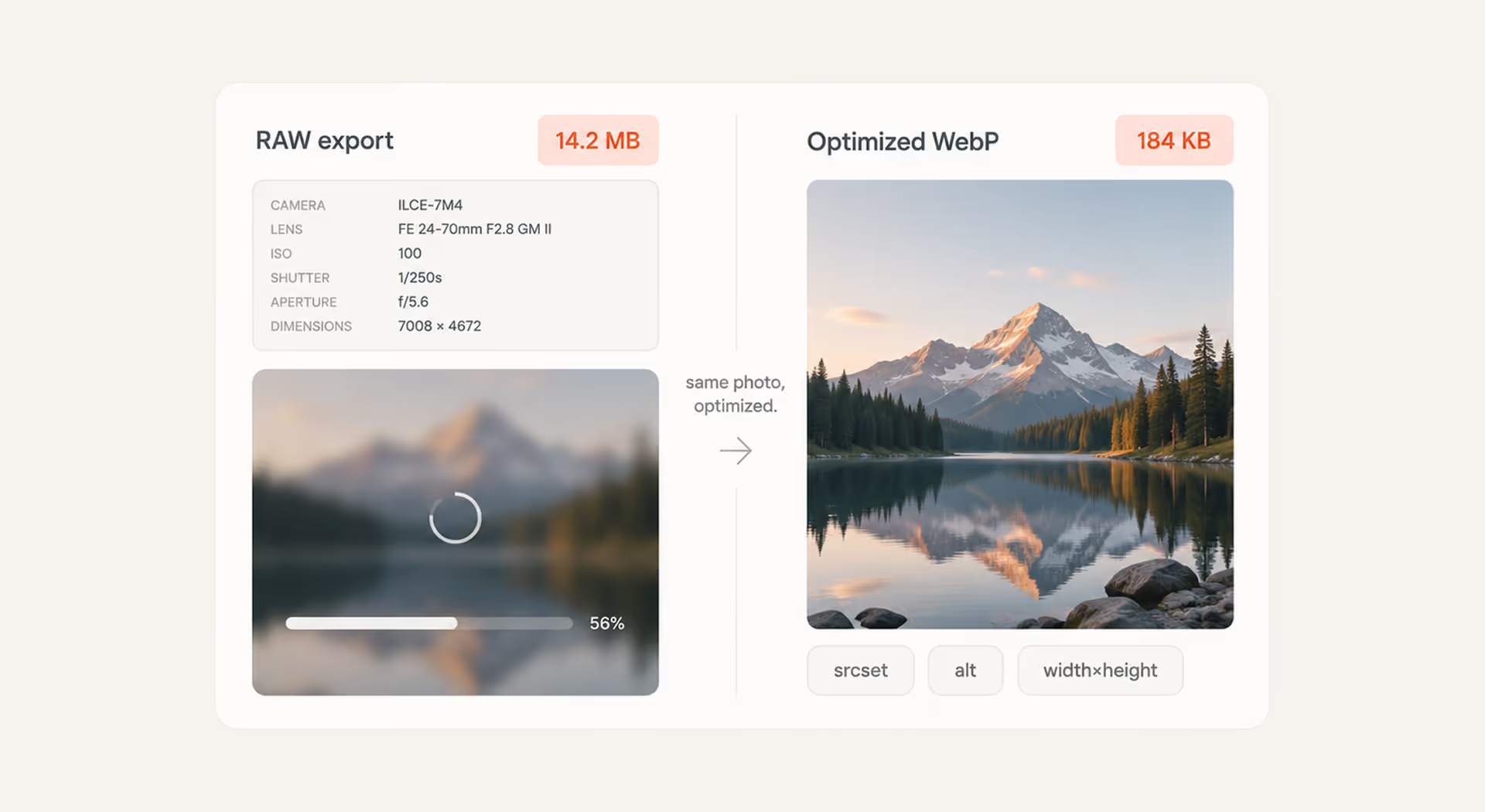
To prevent those losses, you need to cut visual bloat without turning the site into a pixelated mess. That’s what SEO image optimization comes down to: choosing the right compression approach, sizing images for the layouts they actually appear in, and telling browsers which media assets to prioritize. In this guide, we’ll cover these practical mechanics of image SEO and show how they affect performance and search visibility.
What is image optimization in SEO?
Unlike traditional on-page optimization, which focuses largely on written content and page structure, image optimization deals with both performance and search context. It involves reducing file sizes, choosing efficient formats, sizing images correctly, and adding descriptive HTML metadata. Together, these practices help pages load faster and give search engines more context about what each image shows.
Core elements of technical image optimization include:
- Descriptive file names: Replacing default camera outputs like IMG_0042.jpg with clear, relevant names such as custom-leather-boots.jpg.
- Alt text attributes: Writing concise alternative text (alt="") that describes the image for screen reader users and gives search engines additional context.
- Modern formats and dimensions: Using formats such as WebP or AVIF and serving images at dimensions appropriate for how they appear on the page.
- Compression levels: Reducing file size and removing unnecessary metadata without causing a noticeable drop in visual quality.
{{banner}}
Why image optimization matters for SEO performance
Image optimization affects both search visibility and page speed. Well-optimized images help search engines understand your content while reducing the amount of data browsers need to download and process, especially on mobile devices.
Impact on organic rankings and search visibility
A search engine can’t rely on pixels alone. It also looks at the clues around an image — its file name, alt text, nearby copy, and structured data — to work out what the visual represents. When those signals are clear, images are easier to index and have a better chance of showing up across visual search results.
Influence on user experience, engagement, and conversions
Unoptimized visual assets can cause layout shifts, slow scrolling, and delays before users can interact with the page. These problems can push visitors away before they reach a product offer or complete a form. Faster, more stable image loading keeps the experience smoother and makes it easier for users to stay engaged.
Role of images in page speed and Core Web Vitals
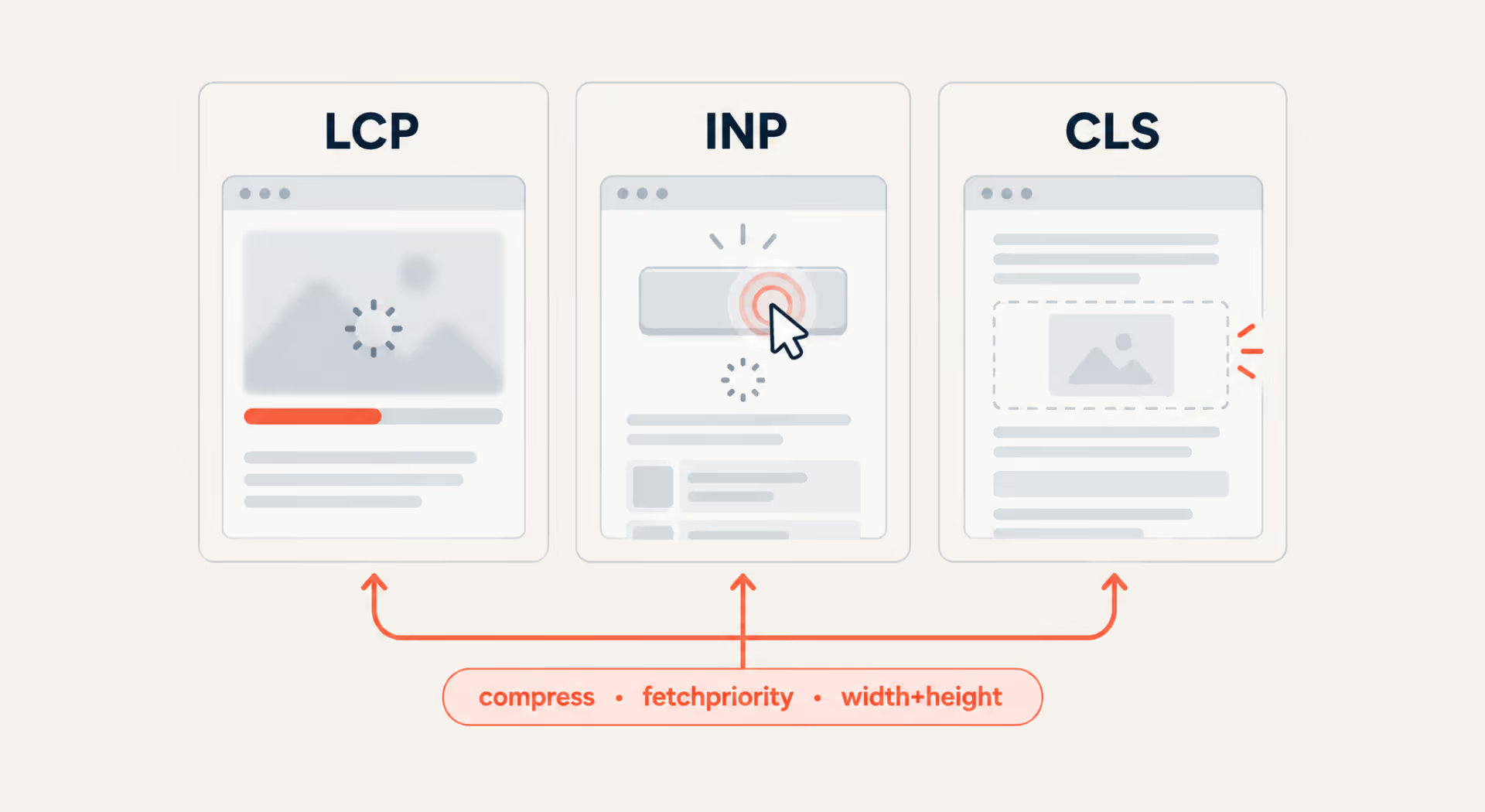
Large hero images are often among the first elements visitors see. If they take too long to load, the whole page can feel slow before users have a chance to interact with it. This can directly affect Largest Contentful Paint (LCP), which measures how quickly the main content becomes visible.
Oversized images also create more work for the browser to download, decode, and resize. For non-critical images, decoding="async" can let other content render without waiting for image decoding to finish.
Layout stability matters too. If the browser doesn’t know how much space an image needs, surrounding content can shift as the asset loads. We saw how much image handling can matter when rebuilding DrPawluk, an e-commerce platform for PEMF therapy devices. Performance improvements, including image scaling, increased the performance score from 71 to 98 and reduced page load time from 5 seconds to 0.9.
If heavy media is slowing down your site, our technical SEO services can help identify and fix layout instability, loading delays, and other performance bottlenecks.
Where images appear in search results
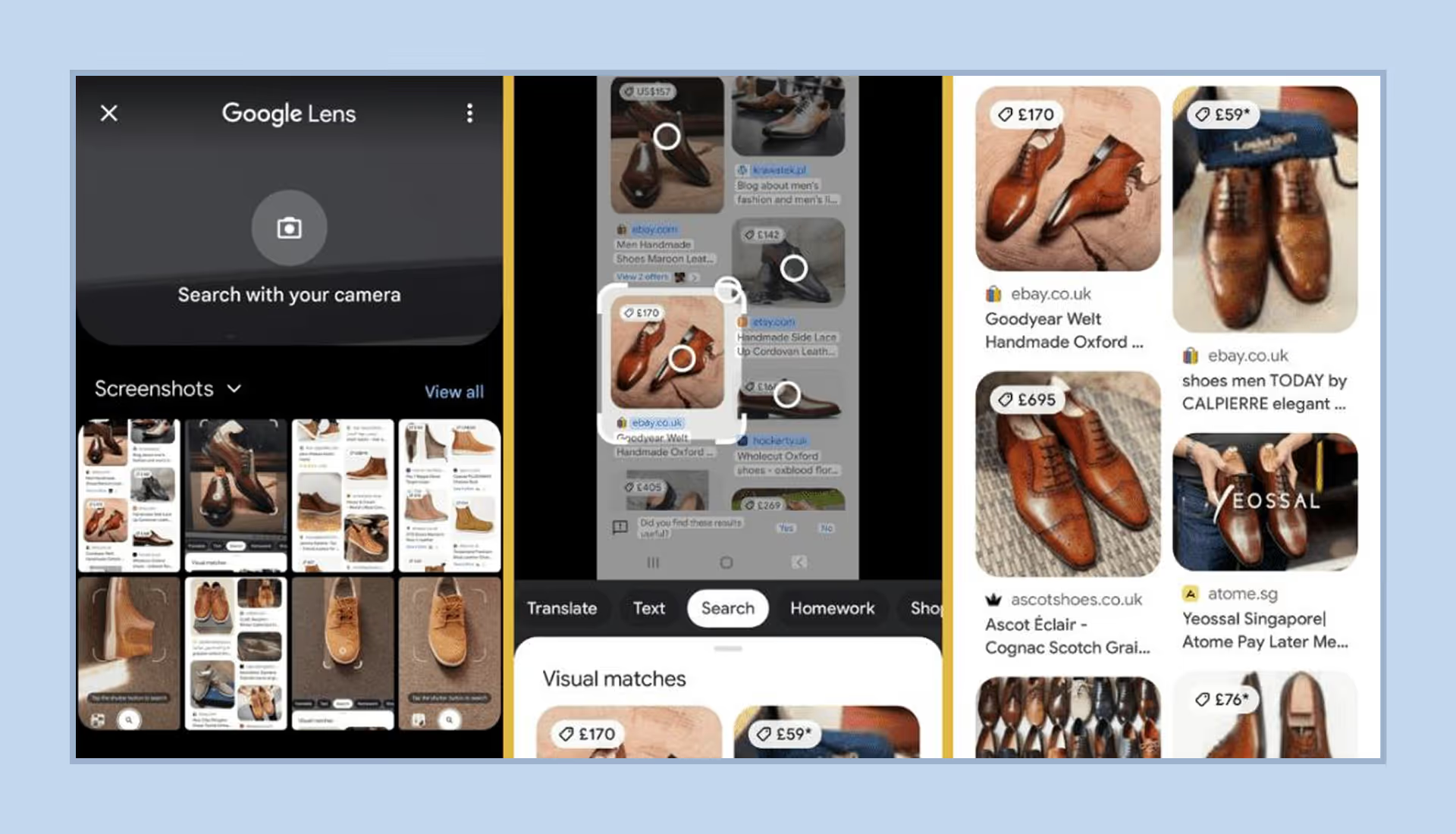
Knowing where Google surfaces visual content helps you optimize images for the search experiences your audience is most likely to use. Beyond the standard Google Images tab, visuals can also appear across several other search features:
- Google Images: A dedicated image search experience where descriptive file names, relevant page context, crawlable image URLs, and useful alt text can help Google understand and index your visuals.
- Image packs in web results: Groups of images that can appear directly within the main search results for queries with strong visual intent.
- Google Discover: A personalized content feed where large, high-quality images can make articles more eligible for prominent visual previews. Google recommends images at least 1200 px wide and allows large previews with max-image-preview:large.
- Google Lens and visual search: Search experiences that let users explore objects, products, places, and other subjects through images rather than text alone.
How search engines index and understand images
Search engines rely on several signals to discover, interpret, and index images:
- Image crawling and rendering: Search engines discover image URLs through HTML, CSS, and image sitemaps, then process those assets to gather visual and technical information about them.
- Context from surrounding content: Headings, paragraphs, page titles, links, and nearby copy help search engines understand what an image shows and how it relates to the page.
- Alt text: Alternative text gives search engines additional context about an image while also making the content more accessible to screen-reader users.
- Structured data and metadata: Schema.org markup and embedded metadata can provide extra details such as creator information, licensing rights, captions, or an image’s relationship to a product, recipe, or other page content.
Image strategy and visual content selection
Adding visual media without a clear purpose can increase page weight and distract readers. A more deliberate visual content strategy helps you focus on the images that actually improve the experience.
Using images only when they add value
Not every page needs an image between every few paragraphs. Generic stock graphics, decorative banners, and filler illustrations can add page weight without giving readers anything useful. Before adding an image, ask, “Does it help explain a process?” or “Does it show something that is difficult to understand from text alone?”
Focus your optimization efforts on visuals that make information easier to understand, such as comparison charts, annotated screenshots, process diagrams, or product images. If an image does not add meaningful information, clear typography and spacing may be enough.
Matching images to search intent
Choose images based on what users expect to find when they search. Here are a few examples:
- Informational queries: diagrams, annotated screenshots, flowcharts, and step-by-step visuals can make complex topics easier to understand;
- Commercial and transactional searches: high-quality product photos, multiple angles, close-ups, scale comparisons, and real-world images;
- Local searches: storefront photos, interior images, maps, and team photos can help users understand the place and build familiarity.
Matching your visuals to search intent makes them more useful to users and can also create more opportunities to appear in relevant visual search features.
Choosing between stock and original images
Stock photography can be useful, but generic images are widely reused across the web and rarely add much unique value to a page. When possible, use original photography, custom illustrations, diagrams, and data visualizations that are created specifically for your content.
Original visuals can also make your content more shareable. Industry blogs and other websites may reference a useful diagram, chart, or infographic and link back to the original source. Authentic photos of your products, locations, or team can feel more trustworthy than generic stock imagery.
We follow this rule on our own blog: every illustration you see in our articles is a custom image built from a written brief by our design team. This approach earns us links and image-pack visibility that a stock photo never will.
“Unique media assets act as link magnets. While stock photography fills visual space, original diagrams and custom photos actively build domain authority.”
Managing copyright and image usage risks
Make sure every image you publish is either created by your team, properly licensed, or available under terms that allow your intended use. Posting images without permission can lead to copyright claims, takedown requests, and other legal problems.
For stock images, check whether the license covers your intended use. For Creative Commons and open-source assets, follow any attribution and licensing requirements, including credit or license links where necessary.
It is also worth keeping records of image licenses, purchase receipts, and attribution details in your CMS. This makes it easier to verify your rights if a copyright question comes up.
Image file formats and modern standards
The format you choose affects file size, image quality, transparency support, and browser compatibility. For SEO, that matters mainly because lighter, appropriately formatted images can improve page performance without sacrificing visual quality. Here’s what to know about the most common web image formats:
- JPEG / JPG: A widely supported lossy format suited to photographs and complex color gradients. It does not support transparency and is generally less efficient than newer formats.
- PNG: A lossless format that preserves sharp edges and supports transparent backgrounds. It works well for diagrams, UI mockups, and logos, though files can become large.
- WebP: A modern format developed by Google that supports lossy and lossless compression. Google’s compression study found WebP files to be 25% to 34% smaller than comparable JPEGs at equivalent visual quality.
- AVIF: A modern format that can deliver substantial file-size savings compared with JPEG while supporting high color depth and transparency.
- SVG: A scalable vector format that stays sharp at different resolutions. It works especially well for logos, UI icons, and flat illustrations.
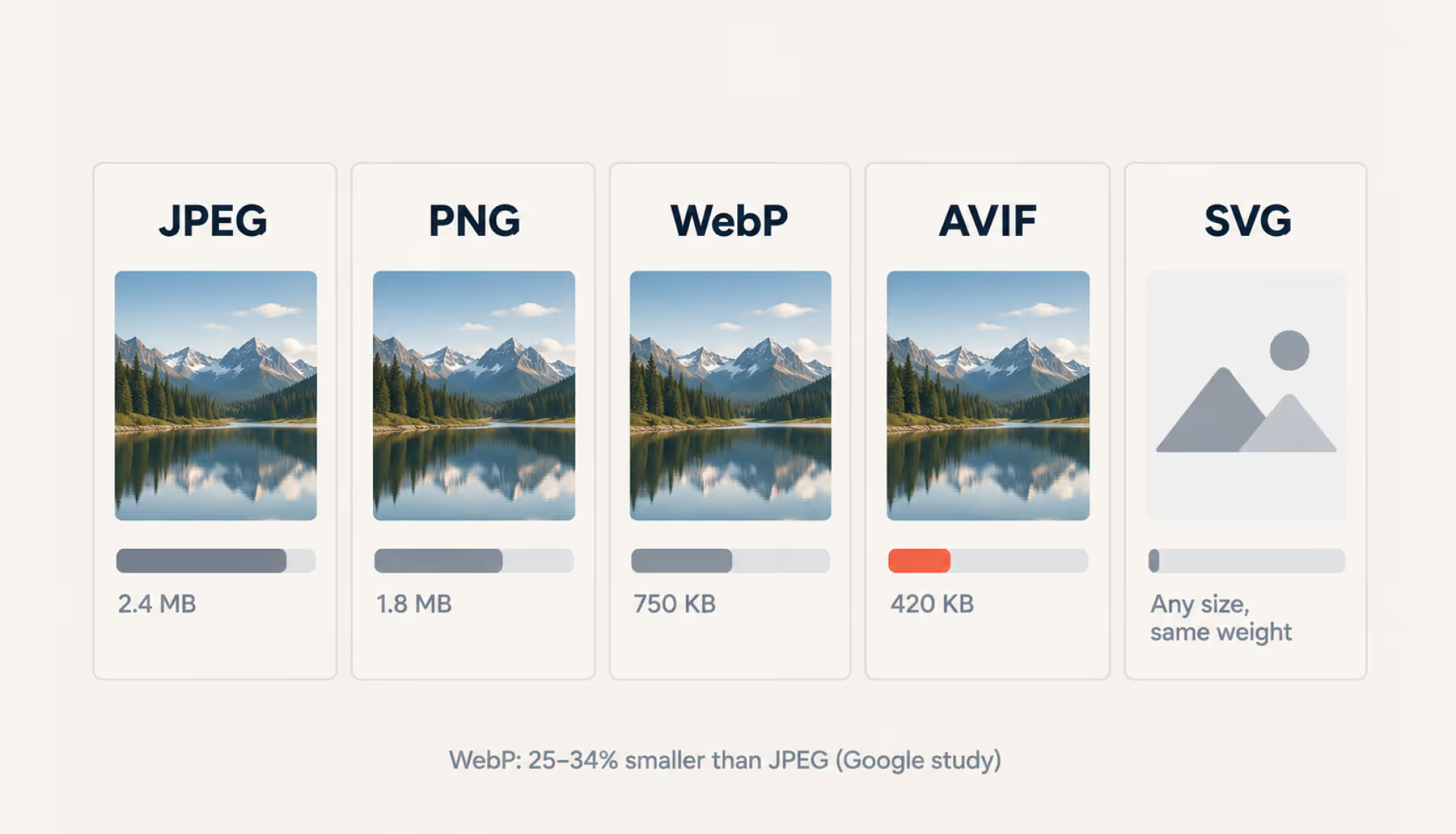
Image performance optimization
Image performance comes down to serving the right image at the right size, without making the browser do unnecessary work. Most of the wins come from four settings: dimensions, format, quality level, and load order.
Defining image dimensions
Avoid relying on client-side CSS or HTML styling attributes to scale down oversized raw images. If a landing page layout displays a photo container at 400x400 pixels, serving a raw 4000x4000 pixel file wastes bandwidth and forces the user’s browser to spend extra processing time resizing the image locally.
Resizing images for the web
Crop and resize media assets to match the maximum rendered container dimensions of your responsive page layouts. Use responsive image attributes (srcset and sizes) inside your HTML markup. This way, browsers automatically download a more appropriate image version based on the user’s screen resolution and viewport width.
Applying image compression
Image compression operates across two primary modes:
- Lossless compression: Re-encodes the image data more efficiently without changing a single pixel. This is what makes a lossless WebP smaller than the same image as a PNG. Stripping embedded metadata (camera model, GPS coordinates, date stamps) is a separate step that saves a further few kilobytes per file.
- Lossy compression: Permanently removes less noticeable image data to achieve larger file size reductions. A quality setting around 80–85 can work well in many cases, but the best level depends on the image and format.
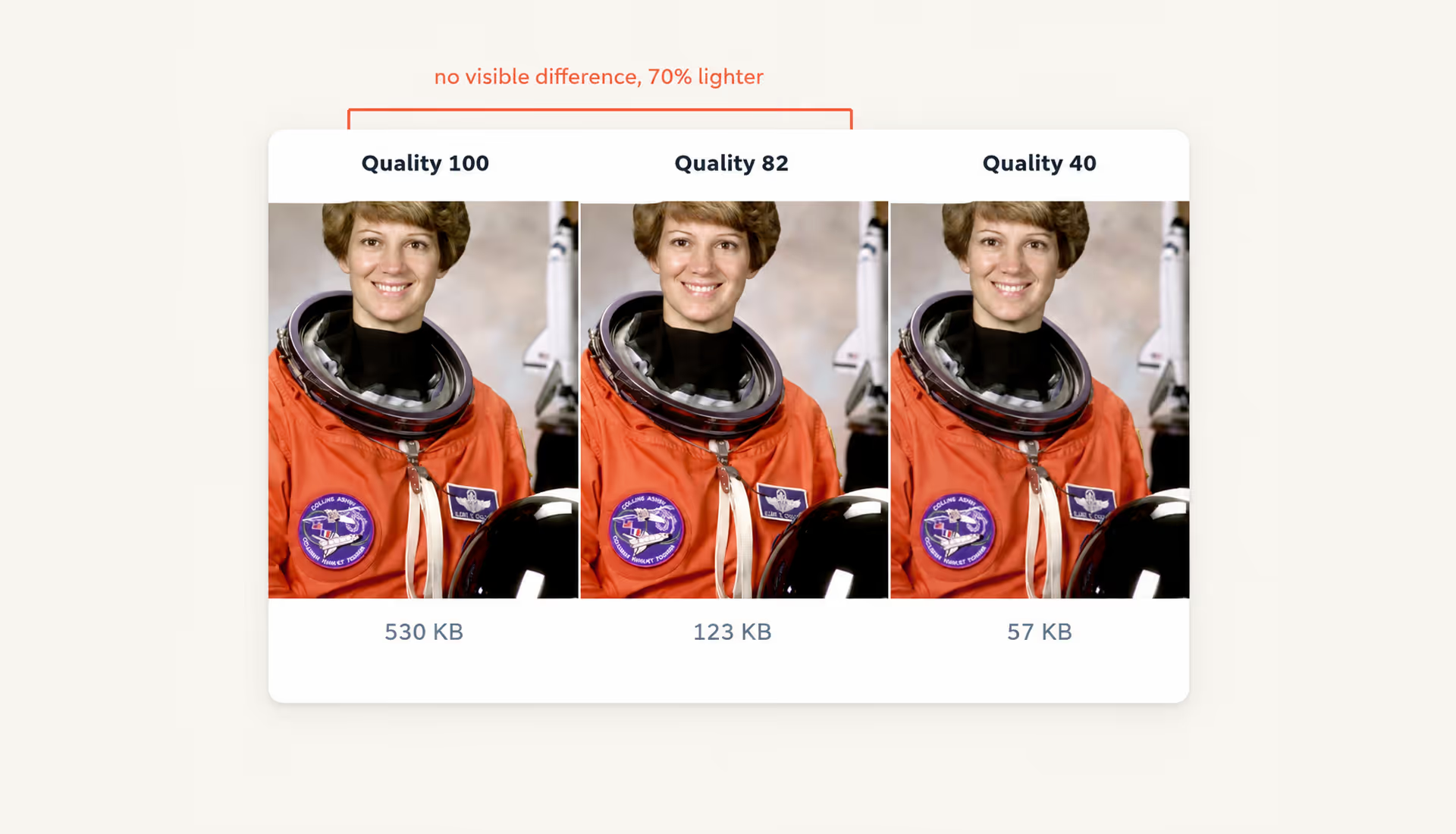
Balancing quality and performance
You can use tools like Squoosh, ImageOptim, or Sharp to reduce file sizes without making images look noticeably worse. The goal is to find the sweet spot where images load faster while staying sharp and clear.
Images and Core Web Vitals
Unoptimized visual media can hurt Core Web Vitals:
- Largest Contentful Paint (LCP): Heavy, uncompressed hero images can delay the main paint event. Mark the hero image with fetchpriority="high" so the browser fetches it ahead of less important assets, and preload it when it isn’t discoverable early in the HTML.
- Cumulative Layout Shift (CLS): Serving images without explicit width and height attributes can cause layout jumps during page load. Specify height and width dimensions in the HTML markup.
Lazy loading and preloading images
Lastly, apply native browser lazy loading (loading="lazy") to all below-the-fold media assets so they download only as the user scrolls down the page. Conversely, avoid lazy loading for primary hero images above the fold; instead, preload those assets (rel="preload") to accelerate your LCP score.
{{banner-2}}
Image delivery and loading techniques
Fast image delivery depends on how efficiently your site serves and loads media. Caching, CDNs, and image optimization services can reduce loading times by delivering files from locations and formats that better suit the user’s device and browser.
“Every unnecessary kilobyte slows the journey from search result to customer.”
Browser caching for images
Configure HTTP Cache-Control headers so browsers can reuse static images instead of downloading them again on repeat visits. For assets that rarely change, long cache lifetimes such as max-age=31536000, immutable can reduce unnecessary network requests.
Serving images via a CDN
Content Delivery Networks (CDNs) cache static image assets on global edge servers distributed worldwide. When a user requests your page, the CDN can serve images from a nearby location, reducing network latency and speeding up delivery.
Image CDNs vs traditional CDNs
While traditional CDNs mainly cache and deliver static files, specialized Image CDNs (like Cloudflare Images, Imgix, or Cloudinary) can also optimize images at the edge. Depending on the request, they can resize assets and serve formats suited to the user’s browser and device before delivery.
Image metadata and on-page SEO signals
Search engines use several basic image details to understand what an image shows and how it relates to the page. File names, alt text, captions, and other page signals all help provide that context.
SEO-friendly image file names
Use descriptive file names that reflect the image subject and separate words with hyphens:
- Bad File Name: DCIM_9921_v2.png
- Generic File Name: shoes.jpg
- Optimized SEO File Name: mens-waterproof-hiking-boots.jpg
Descriptive and accessible alt text
Alternative text (alt="") should clearly describe the image for screen-reader users without forcing or stuffing keywords into the attribute.
Captions and their SEO value
Captions can add useful context when an image needs explanation, especially for charts, screenshots, or data visualizations. Keep them concise and avoid repeating information that is already obvious from the surrounding copy.
Title attributes
The HTML title attribute displays a hover tooltip when users rest their cursor over an image. Title attributes have little SEO value, but they can provide extra guidance for complex charts or downloadable images.
Structured data, sitemaps, and image indexing
Good image SEO also depends on making your images easy for search engines to discover and associate with the right content. Structured data and sitemaps help crawlers discover visual assets and connect them to the right pages and content.
Image structured data
Implementing Schema.org structured data helps search engine bots interpret images within the context of a page. Adding ImageObject schema properties can provide details such as:
- image licensing rights;
- creator credits;
- caption text;
- direct content URLs.
For product pages, use Product schema to associate high-resolution images with the product being marked up. This can help Google show richer product results with details such as ratings, prices, and availability.
XML image sitemaps
Including image URLs in XML sitemaps can help crawlers discover assets that may be harder to find through standard crawling. You can add dedicated image tags (<image:image>, <image:loc>, <image:title>) to your existing page sitemap or maintain a separate image sitemap file. For a more detailed walkthrough, see our guide to website sitemaps.
Improving image discoverability
To make image assets easier to crawl and index:
- Remove robots.txt blockers: Verify that your robots.txt configuration does not unintentionally block Googlebot-Image from accessing important image directories (e.g., /wp-content/uploads/ or /assets/images/).
- Avoid lazy-loading primary assets without fallbacks: Ensure important images remain discoverable in standard HTML and use valid src or srcset attributes rather than relying only on JavaScript-driven loading.
- Use stable, crawlable image URLs: Images can be hosted on your own domain or a CDN, as long as the URLs remain accessible, indexable, and consistent over time.
Social sharing and visual SERP enhancements
Social sharing and visual search enhancements go beyond how images appear in Google results. The right metadata and image formats help your visuals display clearly and consistently across social platforms, link previews, and other external channels.
Open Graph meta tags
Open Graph (OG) tags tell platforms like Facebook, LinkedIn, X (Twitter), and Slack which image and metadata to use for a shared link preview. Specifying the image dimensions and alt text helps prevent awkward cropping and ensures social platforms generate preview cards correctly.
Optimizing images for social sharing
For social sharing covers, 1200×630 pixels is a widely used size for link-preview images. Also, keep primary text overlays centered within safe visual margins so that important titles or branding elements aren’t cut off when platforms crop or resize the image.
Visual consistency across platforms
Using uniform brand imagery, color palettes, and thumbnail styles across your website, Google Business Profile, and social channels reinforces brand recognition and builds user trust.
Advanced image SEO techniques
Image SEO doesn’t stop at file size and alt text. Visual search, product feeds, metadata, and AI-generated media introduce a few more layers to get right.

Optimizing images for Google Lens
Make the object you want Google Lens to recognize easy to isolate. Use clear, high-contrast backgrounds and avoid visual clutter around the main subject. For products, include several angles that reveal texture, scale, logos, and other distinctive details. The surrounding headings and copy should also describe the specific item shown rather than a broader or unrelated topic.
Using IPTC photo metadata
You should add IPTC metadata when image ownership and licensing information matter. This can include the creator’s name, copyright details, and usage rights embedded directly in the image file. These details help establish an image’s provenance and can provide search engines with additional licensing context.
Image SEO for eCommerce and Google Merchant Center
Treat your product feed and website images as a single system. The image URLs in Google Merchant Center should point to stable, high-resolution assets that Google can crawl reliably. For primary images, a clean white or light neutral background is generally a good choice.
AI-generated images and SEO considerations
AI imagery is useful for concepts, illustrations, and other supporting graphics, but be more selective with core product and brand visuals. Generic AI images may lack accurate product details, authentic human interaction, or other information that makes an image useful to searchers. Original photography is usually a better choice for products that need to be represented accurately. Also keep emerging provenance standards such as C2PA in mind, as AI-generated files may carry metadata identifying their synthetic origin.
Identifying and fixing image SEO issues
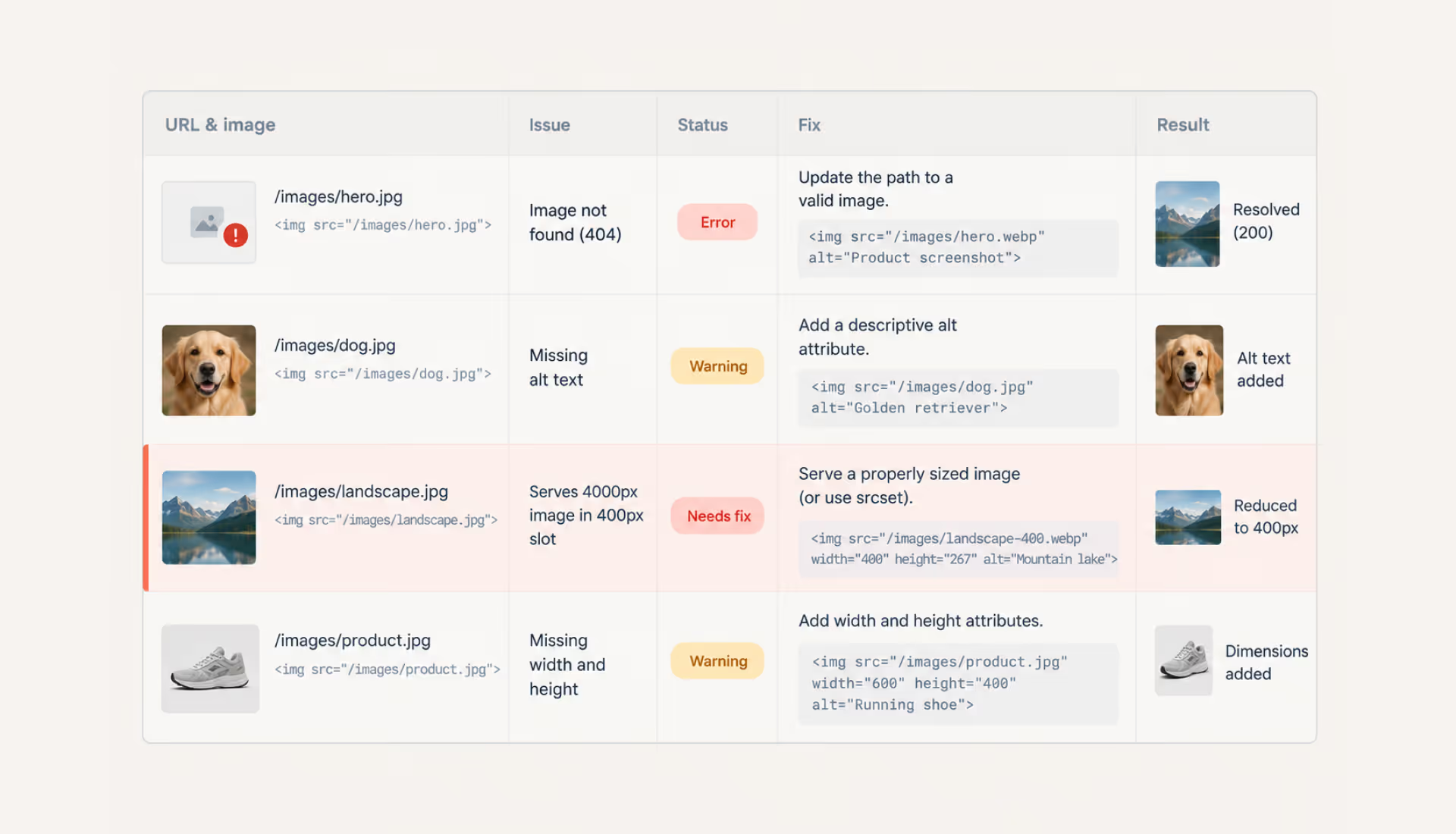
Not every image problem is obvious on the page. Broken URLs, oversized assets, missing attributes, and inefficient loading can quietly hurt performance and search visibility.
{{banner-3}}
Broken image links
Broken image links (404 Not Found or 410 Gone) trigger failed requests, waste crawl and network resources, and can leave empty spaces in page layouts.
How to audit: Run automated site crawlers (like Screaming Frog, Sitebulb, or Ahrefs) and filter internal resources by Type: Image and Status Code: 4xx.
How to fix: Update broken image src or srcset path URLs directly in your HTML templates. If you permanently removed an image asset with external backlinks, set up a server-level 301 redirect to point that image URL to a relevant, existing visual asset.
Missing or poor alt text
Missing alt attributes can create accessibility issues because informative images need a text alternative under WCAG 1.1.1 Non-text Content. Keyword-stuffed alt text can also make descriptions less useful and may be treated as keyword stuffing.
How to audit: Crawl your domain and filter for <img> tags where the alt attribute is completely missing, blank (empty string alt="" on non-decorative images), or contains repeated, unnatural keyphrase strings.
How to fix: Write concise, objective descriptions (under 125 characters is a good working convention, though no official limit exists) detailing what the image visually depicts within the context of the page topic. Reserve empty alt="" attributes for purely decorative design flourishes (like background geometric lines or subtle divider shadows).
Improperly sized images
Serving raw images with pixel dimensions far larger than the display container makes users download unnecessary data and gives the browser more image data to process.
How to audit: Run a Google PageSpeed Insights or Lighthouse report and check the “Properly size images” diagnostic. Pay particular attention to images that are being served at much larger dimensions than they actually render on the page.
How to fix: Generate scaled variations of each asset (for example, 400px, 800px, and 1200px wide) and serve them with responsive markup and explicit dimensions:
<img src="product-800.jpg"
     srcset="product-400.jpg 400w, product-800.jpg 800w, product-1200.jpg 1200w"
     sizes="(max-width: 600px) 100vw, 50vw"
     width="800"
     height="600"
     alt="Red leather running shoe on a wooden desk">
Excessive image requests
On modern connections, the number of image requests matters far less than it once did, because HTTP/2 and HTTP/3 let the browser fetch many files over one connection. The real costs of dozens of small image files today are total bytes, cache misses, and decode work. Icon systems built from individual PNG files also become a maintenance problem long before they become a speed problem.
How to audit: Open Chrome DevTools, go to the Network tab, filter by Img, and look at total transferred bytes rather than the raw request count. Check whether small UI graphics are re-downloaded on navigation instead of served from cache.
How to fix: Move icons to a single SVG sprite referenced with <use> tags, or replace simple UI graphics with CSS. Set long cache lifetimes on versioned assets that rarely change. Skip Base64 inlining as a general tactic — it bloats the HTML document and removes the asset from cache; reserve it for a handful of tiny, truly critical graphics.
Image-related performance bottlenecks
Large media files and inefficient scripts can slow down the browser, delay image rendering, and cause elements to shift as the page loads — all of which can hurt your Core Web Vitals.
How to audit: Record a trace in the Chrome DevTools Performance panel. Check the Main thread track for long red tasks labeled “Image Decode” or “Resize Image,” and review the Experience track for layout shifts caused by media loading without assigned dimensions.
How to fix: Give the primary above-the-fold hero image fetchpriority="high" when it is likely to be the LCP image (preload it if the browser cannot discover it early enough), and apply native lazy loading (loading="lazy") to appropriate below-the-fold images. Ensure all image tags include explicit width and height attributes to reserve layout space in the DOM before assets finish downloading. Add decoding="async" to large below-the-fold images when appropriate to avoid blocking rendering while the image decodes.
Measuring image SEO performance
Image SEO is easier to improve when you can see what is working. Track image visibility, indexing, traffic, and page performance to identify problems and measure the impact of your optimization efforts. The sections below show where to look.
“If you don’t measure image traffic, you’re missing part of your organic growth.”
Image traffic in GSC
Google Search Console (GSC) provides direct reporting on Google Image Search performance. Open the Performance report, switch the Search Type filter from “Web” to “Image,” and analyze total impressions, clicks, and average position. Use the Queries and Pages tabs to see which searches and landing pages are driving image-search visibility.
Image indexing and coverage
Use the Page Indexing report to check whether the pages hosting your images are being crawled and indexed correctly. For specific pages, the URL Inspection tool can help uncover indexing or crawlability issues that may also affect their images.
Performance metrics
Use performance testing tools to measure how image optimization affects page performance:
- Google PageSpeed Insights: Tracks field and lab data for LCP, CLS, and INP metrics. It can surface image-related opportunities that affect loading performance.
- WebPageTest: Delivers granular waterfall charts that highlight slow DNS lookups, long image download times, and main-thread processing bottlenecks across specific geographic nodes and mobile devices.
- Chrome DevTools (Performance & Network Panels): Lets developers measure network payload sizes, audit image decoding overhead, and test local caching performance under simulated network throttling.
Competitive image SEO analysis
Audit competing landing pages that rank at the top of Google Images for your high-priority target keywords:
- Analyze their image dimensions, file formats (AVIF vs. WebP vs. JPEG), and raw byte sizes.
- Inspect their alt text structures, file naming conventions, and schema markup.
- Examine how surrounding body paragraphs and page headings frame visual media context.
These comparisons can reveal simple opportunities to improve how you manage and optimize your images.
Treat image optimization as an ongoing process
Image optimization works best when it becomes part of how a site is built and maintained. The format you choose, the dimensions you serve, the way an image loads, and the context around it all affect a different part of the same experience. A technically perfect asset still adds little if it does not help the reader, while a useful visual can underperform if it is too heavy, difficult to crawl, or poorly prepared for the layout.
That is why there is no single setting that “solves” image SEO. A hero image, product photo, diagram, and social preview all have different jobs and should be optimized accordingly. The more useful approach is to build a few good decisions into the workflow: choose visuals with a purpose, prepare them for where they will appear, make them accessible to users and search engines, and check how they perform once the page is live.
{{banner-4}}
FAQ
Do images directly affect Google rankings?
Images can affect search performance in several ways. Their size, dimensions, and loading behavior can influence Core Web Vitals such as LCP and CLS. At the same time, descriptive file names, alt text, and relevant surrounding content help Google understand what an image shows and how it relates to the page, which can improve visibility in both web and image search.
Is WebP or AVIF better for SEO today?
AVIF generally compresses further than WebP at equivalent visual quality — against JPEG, savings of up to half the file size are common in codec comparisons. However, WebP enjoys broad compatibility across modern browsers and content management platforms. Where your stack supports it, you can serve AVIF to compatible browsers while keeping WebP or JPEG as fallback options in a <picture> element.
How many images should a page have for SEO?
There’s no set number of images you need for SEO. Add visuals when they genuinely help explain an idea, showcase a product, or support the surrounding content. Adding images just to hit a certain number can make pages heavier, slow them down, and hurt Core Web Vitals.
Can AI-generated images rank in Google Images?
Yes, AI-generated images can appear in Google Images if Google can crawl and index them and the surrounding page provides enough useful context. But generic AI visuals can feel repetitive or fail to accurately represent real products and situations, which may hurt engagement. For important brand and product imagery, combining AI tools with original photography or custom diagrams can make the content more useful and trustworthy.
How often should images be re-optimized for SEO?
Run a visual audit when you redesign key pages, change your site structure, or see your Core Web Vitals scores drop. It’s also worth reviewing older images periodically, especially on high-traffic or business-critical pages. Replace outdated JPEGs and PNGs with WebP or AVIF where it makes sense, fill in missing alt text, and add responsive srcset markup to older content.